


Today Embarcadero released Kai 1.0.2, a further maintenance update focused on improving compatibility, installation reliability, internationalization, and overall product quality for our agentic AI engine for RAD Studio.
Kai 1.0.2 builds on the features introduced in the first release of Kai and on the improvements introduced in version 1.0.1, primarily addressing international language support, but offering also other enhancements including the support for completions using additional AI engines. Installing this update is highly recommended for all Kai users, whether using a paid license or the trial version.
Table of Contents
What is Kai?
Embarcadero Kai is an AI-powered, agentic development assistant for RAD Studio that helps Delphi and C++Builder developers write, understand, refactor, and modernize code directly within the IDE. It supports leading cloud AI models as well as local LLMs, enabling developers to automate development tasks while maintaining control over their code, models, and workflows.
Expanding Completions Support
Kai support for completions (available as Ghost test, Code Completions and Code Suggestions) has been expanded to offer integration with additional local AI engines. Once you select the local models tab for completions, you can also pick the URL as before, but also the backend engine you are using:
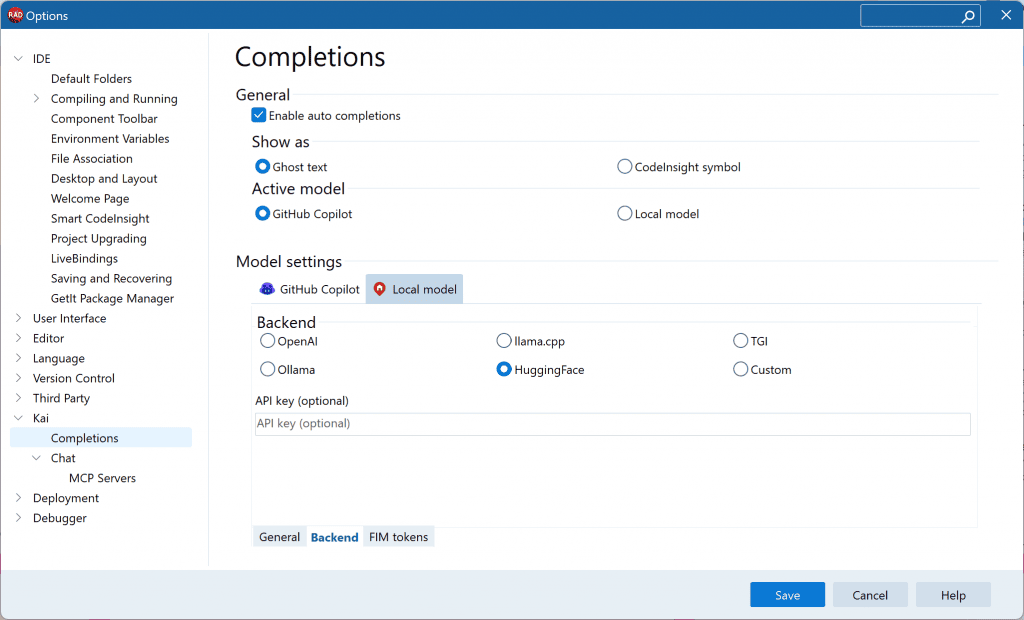
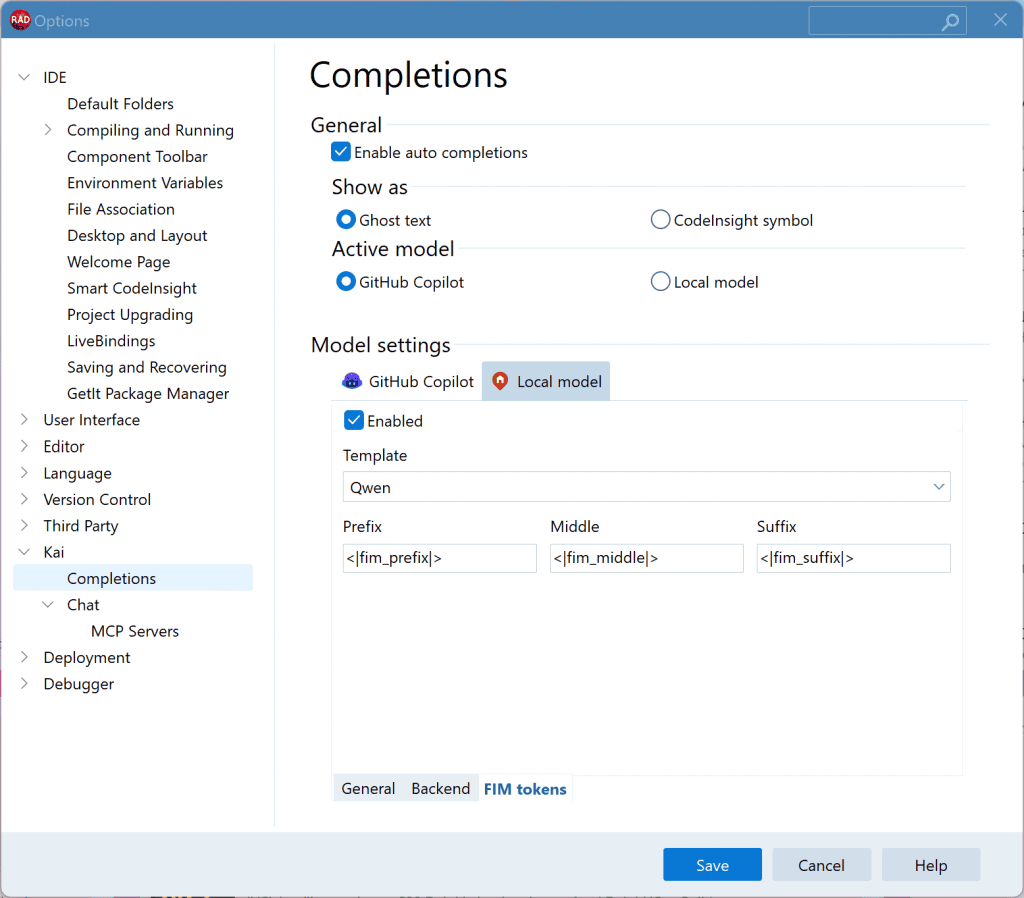
To make these different engines work, the configuration page includes the ability to configure another new Kai parameter, the FIM tokens.
FIM (Fill-In-the-Middle) tokens are special control tokens that tell a language model to complete text between a given prefix and suffix, rather than simply continuing from the end of a prompt. They are particularly important for code completion in IDEs, where the model needs to insert code at the cursor while preserving the code that follows.
Considering that different model families use different special tokens, Kai makes it now possible to pick predefined options or manually customize the FIM tokens, as you can see below:
To determine if a local LLM supports FIM, you can (for example) check the model information on Hugging Face or the vendor’s documentation. It will often explicitly state “Supports Fill-in-the-Middle (FIM).” You can also inspect the tokenizer’s special tokens (tokenizer_config.json or special_tokens_map.json) for FIM tokens. Popular local coding models with FIM support include:
- StarCoder
- CodeLlama
- DeepSeek-Coder
- Qwen2.5-Coder
- Codestral
- Replit Code models
Improved Compatibility and Reliability
Kai 1.0.2 delivers another round of quality improvements that make the product more robust across. The update focuses on five key areas:
- Better international language support. Improved compatibility with non-English Windows environments, including systems using ANSI code pages, extended European characters, and Japanese and Korean input methods (IME), making Kai work more naturally for developers around the world. This release addresses a locale issue made more visible by the 1.0.1 release and introduces an improved IME model in the chat.
- Enhanced AI provider compatibility. Expanded support for additional AI deployment scenarios, including improvements for LiteLLM environments and GitHub Enterprise Cloud authentication when using GitHub Copilot.
- Improved usability. Added small but useful enhancements to everyday workflows, including the ability to copy content directly from the Kai chat window and improved handling of Windows user profiles containing spaces.
- Additional security. As part of our ongoing commitment to product quality, this release includes internal security improvements that strengthen Kai’s MCP communication infrastructure.
Together, these improvements make Kai more reliable, more compatible with enterprise AI environments, and more polished for developers working across different languages and system configurations.
Customer-Reported Issues Addressed
As part of this update, the development team resolved a number of customer-reported issues submitted through the Embarcadero Quality Portal and through direct customer feedback, including:
- RSS-5555 Kai Completions: No GitHub Enterprise Cloud (GHE.com) support for GitHub Copilot authentication
- RSS-5550 No ‘Copy’ option in popup of KAI chat window
- RSS-5508 Korean IME fails inline composition, forcing a broken OS composition window (Delphi Framework Level Issue)
- RSS-5640 KAI package fails to load with EEncodingError unless Windows UTF-8 system locale is enabled
- RSS-5608 Kai 1.0.1 installation via GetIt
How to Get Kai 1.0.2
The new version of Kai is already available in GetIt. You can find it in the GetIt Package Manager dialog or from the Kai Welcome Page. The installer automatically removes the previous version and installs Kai 1.0.2. A restart of RAD Studio is required to complete the update.
Kai 1.0.2 will also be available shortly from the Embarcadero Download Portal at my.embarcadero.com.
Interested in a Trial?
If you haven’t tried Kai and are interested in a trial license, there are three ways to get one:
- Existing RAD Studio, Delphi, or C++Builder 12.x/13.x customers with a named-user license can install Kai from GetIt (or download it from the Customer Portal), then redeem a 30-day Kai trial license using their existing product license key on the Kai redemption page.
- Existing Network/Concurrent license customers can contact Embarcadero Sales to obtain a Kai trial license.
- Developers not on a recent version of RAD Studio can download the RAD Studio trial, which already includes a Kai trial license. Simply install Kai afterwards from GetIt or the Welcome Page.
Work on Kai is Continuing
We’re continuing to invest in Kai with regular quality improvements, expanded AI provider support, enterprise-ready capabilities, and new features driven by customer feedback. We encourage all Kai users to install version 1.0.2 and continue sharing suggestions and ideas through the Embarcadero Quality Portal.



Reduce development time and get to market faster with RAD Studio, Delphi, or C++Builder.
Design. Code. Compile. Deploy.
Free Delphi Community Edition Free C++Builder Community Edition



Installed Kai from GetIt, wanted a 30 day trial, but all I get is Delphi / RAD registration, which I already have.. how can I start Kai trial from Delphi 13.1 registered version?