


Securing a Model Context Protocol (MCP) server is not a single task. There are a few different problems to solve. Your server probably talks to something that needs a secret (a database password or an external API key) so that secret has to be stored safely. If it’s reachable over HTTP, you also need to establish who is on the other end of the connection, and, once you know that, decide what that caller is actually allowed to do. Not every server faces every problem: which ones apply to you depends mostly on the transport and on who uses the server.
This article walks through storing credentials safely, authenticating the caller, and authorizing what they can access, showing how each is handled with MCPConnect. It is meant to be practical: pick the mechanism that fits your case, then configure it with a few lines of code.
Table of Contents
Choosing the best approach for MCP security
The first decision is driven by the transport. STDIO servers run as a child process of a trusted client on a controlled machine, while HTTP servers can be reached by anything that can open a socket.
For an HTTP server, the next question is how callers prove who they are. If they can be handed a key (one user, a trusted team, a handful of customers, or another program calling your server), API keys do the job: a single shared secret, or keys you validate yourself and map to a caller. If users should log in with their own account, or you want to use an identity provider you already have, use OAuth 2.1.
CORS is a separate choice. It is not a way to authenticate the caller: you only need it when browser-based clients connect to your server, whichever authentication you picked.
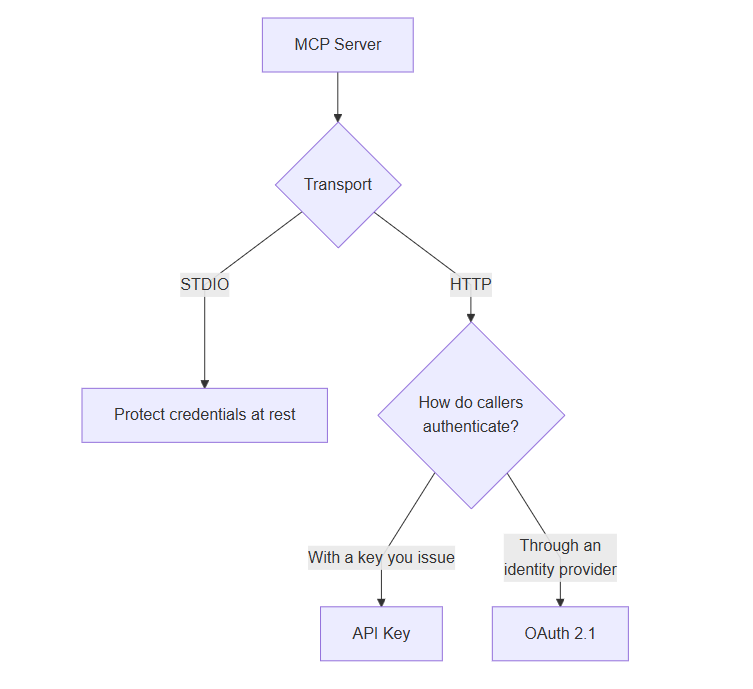
The rest of the article expands each branch.
How to store credentials for MCP servers
For STDIO servers the problem is usually smaller, because the environment is more controlled. Most MCP clients let you pass environment variables or command-line arguments to the server when it starts. Prefer environment variables. Arguments passed to an executable are visible to other users through tools such as the Windows Task Manager, so a token placed on the command line is effectively public.
When environment variables are not an option, use a conventional configuration file (INI, JSON, and so on) and encrypt any sensitive values. A good reference is FireLinkMCP, a Delphi MCP server that exposes local databases. It can seal passwords with the Windows Data Protection API (DPAPI) or read them from an environment variable, and it never embeds a key in the executable or exposes the secret to the MCP client.
DPAPI is a good fit when the server runs under a fixed Windows account on one machine: it encrypts the value so that only that account on that machine can decrypt it, and you do not have to manage a key yourself. It is not the right tool for secrets that have to be shared across machines or deployments — use an environment variable or a secret store there.
That same pattern — keep secrets out of the executable and out of the command line — applies to any MCP server you write.
Configuring an API Key authentication over HTTP for MCP
For an HTTP transport, the simplest way to restrict access is to require a valid API key on every request. MCPConnect provides this through the IAuthTokenConfig plugin.
ℹ️ Note
The features described in this section — custom key validators, caller identity, the 401 challenge and the STDIO exemption — are available in the latest version of MCPConnect on GitHub.
Add the unit to your uses clause:
|
1 2 |
uses MCPConnect.Configuration.Auth; |
Then configure the plugin on your TJRPCServer instance:
|
1 2 3 4 |
FJRPCServer .Plugin.Configure<IAuthTokenConfig> .SetToken('my-secret-token') .ApplyConfig; |
Once a token is set, the server checks every incoming request and rejects those that do not carry the expected value with 401 Unauthorized and a WWW-Authenticate header. The token is compared case-sensitively, in constant time, so the response time does not reveal how much of a guessed key was right. Failed attempts are logged, never with the key itself.
The check applies to HTTP only. The STDIO transport has no headers to carry a key, and a server spawned by its client already runs with that client’s authority, so there it is skipped.
Where does an MCP connection look for an authorization token?
By default MCPConnect reads the token from the standard Authorization header using the Bearer scheme:
Authorization: Bearer my-secret-token
The TAuthTokenLocation enum lets you change that. You can read the token from a custom header or from a cookie, which is useful when integrating with existing clients or session infrastructure.

A custom header:
|
1 2 3 4 5 6 |
FJRPCServer .Plugin.Configure<IAuthTokenConfig> .SetToken('my-api-key') .SetTokenLocation(TAuthTokenLocation.Header) .SetTokenCustomHeader('X-API-Key') .ApplyConfig; |
A cookie:
|
1 2 3 4 5 6 |
FJRPCServer .Plugin.Configure<IAuthTokenConfig> .SetToken('my-session-value') .SetTokenLocation(TAuthTokenLocation.Cookie) .SetTokenCustomHeader('SessionId') .ApplyConfig; |
With the Header and Cookie locations a name is required: if SetTokenCustomHeader is missing, ApplyConfig raises an exception at startup instead of letting every request fail silently.
How to validate MCP authorization keys in your own code
A single key hard-coded in the configuration is fine for a quick setup, but real deployments usually need more: one key per customer, keys stored in a database, keys that can be revoked or expire. For that, write your own validator with SetTokenValidator:
|
1 2 3 4 5 6 7 8 9 10 11 12 13 14 15 16 17 18 19 |
FJRPCServer .Plugin.Configure<IAuthTokenConfig> .SetTokenLocation(TAuthTokenLocation.Header) .SetTokenCustomHeader('X-API-Key') .SetTokenValidator( function (AContext: TJRPCContext; const AToken: string; AIdentity: TMCPAccessToken): Boolean var LCustomer: TCustomer; begin Result := MyKeyStore.TryFindCustomer(AToken, LCustomer); if not Result then Exit; AIdentity.Subject := LCustomer.Id; AIdentity.Name := LCustomer.Name; AIdentity.Scope := 'tasks:read tasks:write'; end) .ApplyConfig; |
The validator receives the request context, the key sent by the client (never empty) and the caller’s identity to fill in. Here are the rules:
- Return
Trueto accept the key. - When a validator is registered, the token set with
SetTokenis ignored. - It is called concurrently from every request thread, so whatever it uses must be thread-safe.
- An exception raised inside it is logged and treated as a rejected key: the client gets a
401, never a500, and never the error message.
If you cannot pass an anonymous method — for example from C++Builder — register a class implementing IAuthTokenValidator with SetTokenValidatorClass instead. One instance is created per request, so the class needs a parameterless constructor and must be reference counted (descending from TInterfacedObject is the usual way).
How to work out who or what is calling your MCP server
The AIdentity parameter is the same TMCPAccessToken object that OAuth fills with the claims of a JWT (see Reading the token inside a tool). It is created empty for every request and injected into the request context, so whatever the validator writes into it — through the Subject, Name, EMail, Scope, ClientId setters, or any custom claim added to Payload — is what your tools read through [Context].
This makes API keys more than a gate. A plain shared secret answers “is this caller allowed in?”; a validator also answers “who is this caller?”, and the scopes you assign to the key decide what the caller may do (see Authorizing tools, resources and prompts). What API keys cannot give you is a login: users never authenticate with their own account, unless a per-user key is handed out, which identifies them but is still not a login. When you need a real login, use OAuth.
How to deal with CORS in MCP connections
Browser-based MCP hosts (for example MCPJam Inspector or web-based clients) send requests from a page served on a different origin. The browser enforces the Same-Origin Policy and blocks the responses unless the server opts in with CORS (Cross-Origin Resource Sharing) headers. In short, CORS is the mechanism by which a server tells the browser which origins, methods, and headers it is willing to accept.
CORS is configured in the .Security section of IMCPConfig:
|
1 2 3 4 5 |
.Security .SetCORS(True) .SetAllowedMethods(['GET', 'POST']) .SetAllowedOrigins(['http://localhost']) .BackToMCP |
Key settings:
| Method | Description |
SetCORS(True) | Enables CORS headers on every response, including errors and well-known endpoints |
SetAllowedMethods(methods) | HTTP methods to allow. POST is enough for JSON-RPC; add GET to let browser clients open the SSE stream. OPTIONS preflights are always answered |
SetAllowedOrigins(origins) | Allowlist of accepted origins. Supports exact matches and wildcard subdomains such as https://*.example.com |
SetCookieSecure(False) | Disables the Secure flag on session cookies. For plain-HTTP development only; cookies are HttpOnly + SameSite=Strict + Secure by default |
Be careful with the origin allowlist. If SetAllowedOrigins is never called, any origin is accepted, including requests that carry no Origin header. As soon as you set an allowlist, requests with a missing or unmatched origin are rejected — which can break command-line tools such as curl or Bruno that do not send an Origin header. For development you can omit the call or guard it with a conditional:
|
1 2 3 4 5 6 7 |
.Security .SetCORS(True) .SetAllowedMethods(['POST']) {$IFNDEF DEBUG} .SetAllowedOrigins(['https://my-production-origin.com']) {$ENDIF} .BackToMCP |
How to use OAuth 2.1 with MCP
When you need to identify the actual user behind a request and make authorization decisions based on that identity, OAuth 2.1 is the recommended approach. It is the authorization framework adopted by the MCP specification: clients obtain limited access to server resources on behalf of a user, without sharing the user’s credentials directly. For a broader introduction to how OAuth works in MCP, see the MCPJam OAuth guide.
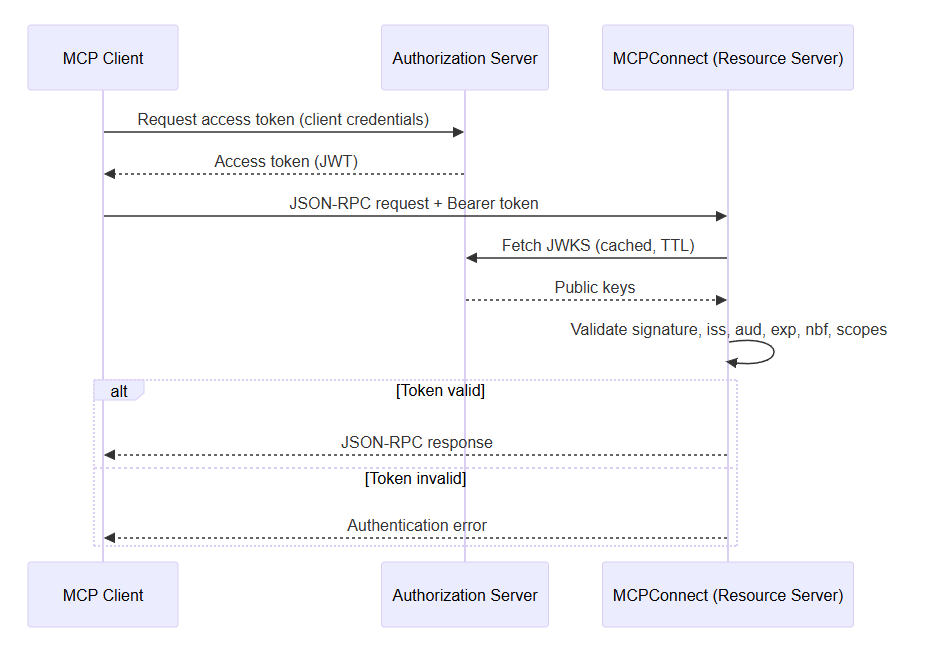
MCPConnect acts as an OAuth 2.1 resource server. It does not implement an authorization server; it delegates authentication to an external provider. If you do not already have one, you can use a commercial service such as Microsoft Entra ID, or a free, self-hosted option such as Keycloak. Auth0, Okta, and any OpenID Connect provider also work.
MCPConnect currently supports only the preregistration (client credentials) mode: the MCP client is registered with the authorization server in advance and uses its own credentials to obtain an access token.
A diagram of the OAuth flow between an MCP client and an MCP server
How to configure your MCP connection to support OAUTH
OAuth is configured through the IOAuthConfig plugin:
|
1 2 3 4 5 6 7 8 9 10 11 12 13 14 |
uses MCPConnect.Configuration.Auth, MCPConnect.Security.Token; AServer .Plugin.Configure<IOAuthConfig> .SetResource('https://mcp.example.com/mcp') .AddAuthorizationServer('https://auth.example.com') .AddTrustedIssuer('https://auth.example.com/') .SetTokenValidatorClass(TJoseTokenValidator) .AddScopesSupported('openid') .AddScopesSupported('email') .AddScopesSupported('profile') .ApplyConfig; |
If no authorization server is configured, OAuth enforcement is fully disabled and every request is allowed through.
In practice these values are read from environment variables, as in the MCPServerOAuth demo:
|
1 2 3 4 5 6 7 8 9 10 11 12 13 14 |
AServer .Plugin.Configure<IOAuthConfig> .SetResource(GetEnvironmentVariable('OIDC_MCP_SERVER')) .AddAuthorizationServer(GetEnvironmentVariable('OIDC_AUTH_SERVER')) .AddTrustedIssuer(GetEnvironmentVariable('OIDC_TOKEN_ISSUER')) {$IFDEF DELPHI_JOSE_JWT} .SetTokenValidatorClass(TJoseTokenValidator) {$ELSE} .SetTokenValidatorClass(TClaimsTokenValidator) {$ENDIF} .AddScopesSupported('openid') .AddScopesSupported('email') .AddScopesSupported('profile') .ApplyConfig; |
Notable options:
| Method | Description |
SetResource(url) | Canonical public URL of this MCP server. Call it first; other methods derive URLs from it |
SetRealm(realm) | realm sent in the WWW-Authenticate header. Defaults to 'mcp' |
AddAuthorizationServer(url) | Registers an external authorization server. Can be called multiple times |
AddTrustedIssuer(url) | Adds a trusted token issuer. Useful when the token’s iss differs from the discovery URL (for example Entra ID v1.0 tokens) |
SetTokenValidatorClass(class) | Registers the class that validates bearer tokens. Without it, every bearer token is rejected |
SetAudience(audience) | Value the token’s aud claim must contain. Defaults to SetResource |
AddRequiredScope(scope) | Scope the token must carry, otherwise the request fails with insufficient_scope |
SetClockSkew(seconds) | Tolerance on exp/nbf claims. Defaults to 60 |
SetKeyCacheTTL(seconds) | Lifetime of the cached JWKS. Defaults to 3600 |
EnableMetadataProxy(issuer) | Proxies the authorization server’s discovery document, patching missing fields (see The metadata proxy) |
Token validators (JWT and JOSE tokens)
MCPConnect ships three validators, with different levels of strictness:
| Validator | What it checks | What it checks |
TJoseTokenValidator | Everything, including the cryptographic signature verified against the provider’s published JWKS keys | Production |
TClaimsTokenValidator | iss, aud, exp/nbf, required scopes, rejects "alg": "none", verifies the kid exists in JWKS — but does not verify the signature | Testing with a real provider |
TDecodeOnlyTokenValidator | Decodes the payload and verifies nothing | Local development only |
TJoseTokenValidator requires the JOSE-JWT library at compile time (controlled by the DELPHI_JOSE_JWT define in MCPConnect.inc) and the OpenSSL libraries at runtime.
How to read an MCP access token inside a tool
Once a request is authenticated, the validated claims are available through [Context] injection as a TMCPAccessToken. This means a tool can behave differently based on who is calling, with no extra code to pass the identity in:
|
1 2 3 4 5 6 7 8 9 10 11 12 13 14 15 16 |
TTestTool = class private [Context] FToken: TMCPAccessToken; public [McpTool('get-user', 'Get the current user information')] function GetUser: TUser; end; function TTestTool.GetUser: TUser; begin Result := TUser.Create; Result.Name := FToken.Name; Result.EMail := FToken.EMail; Result.Subject := FToken.Subject; end; |
TMCPAccessToken exposes the standard claims (Subject, Name, EMail, Scope, Issuer, Audience, Expiration, and others) plus the raw JWT payload through the Payload property, for access to any claim that is not surfaced directly. To test the scopes, use HasScope('orders:read') rather than searching the Scope string: it matches whole, case-sensitive scopes only, so orders does not satisfy orders:read.
The same object is filled by an API key validator (see How to work out who or what is calling your MCP server), so a tool written this way works unchanged whichever authentication the server uses.
How to test and debug OAuth
Testing OAuth is often trickier than it looks. The token has to come from a real provider, the discovery document has to match what the server expects, and a failure at any step — discovery, redirect, token exchange, or validation — can look identical from the client side. Tools such as MCPJam, with its OAuth debugger, help here: they let you inspect every stage of the authentication flow, so you can see exactly where it breaks instead of guessing.
The metadata proxy
Some providers support features that MCP requires but do not advertise them in their discovery metadata. A common example is Microsoft Entra ID: it supports PKCE, which MCP mandates for the authorization code flow, but its metadata does not always list code_challenge_methods_supported, so a strict client refuses to start the flow. MCPConnect’s metadata proxy (EnableMetadataProxy(issuer)) mirrors the authorization server’s discovery document through the MCP server, patching the missing fields on the way. Reach for it when a provider works in practice but fails discovery, not by default.
How to set up HTTPS while developing
OAuth providers usually require the channel back to the MCP server to be secure (HTTPS), and a valid local certificate is awkward to set up. Some go further and simply refuse to work with a localhost redirect at all, so there is nothing to configure around. A tunnel service such as Cloudflare Tunnel or Microsoft Dev Tunnels gives you a public HTTPS endpoint that forwards to your local server, so the provider can redirect to a URL it trusts. That is enough to exercise the full flow during development without deploying anything.
How to authorize tools, resources and prompts for MCP
Authentication tells you who the caller is; authorization decides what that caller can see and use. Checking the scopes by hand inside every tool works, but it is easy to forget one, and the tool still shows up in the list the client hands to the model. MCPConnect lets you declare the requirement once, next to the code it protects.
ℹ️ Note
The scope-based authorization described in this section (McpRequiredScope, RequireScope and the custom authorizers) is available only in the latest version of MCPConnect on GitHub.
Declaring the required scopes
The McpRequiredScope attribute lists the scopes the caller’s token must all carry, separated by commas or semicolons. It works on tools, resources, resource templates, App UIs and prompts:
|
1 2 3 4 5 6 7 8 9 10 11 12 13 14 |
uses MCPConnect.MCP.Attributes; type [McpRequiredScope('orders:read')] TOrderTools = class public [McpTool('list_orders', 'Lists the orders')] function ListOrders: TArray<TOrder>; [McpTool('delete_order', 'Deletes an order')] [McpRequiredScope('orders:write, orders:admin')] function DeleteOrder([McpParam('id', 'Order id')] const AId: string): Boolean; end; |
On a class the attribute applies to everything the class registers; on a method it adds to the class requirements. Here list_orders needs orders:read, while delete_order needs orders:read, orders:write and orders:admin. Items without the attribute stay open to every caller, exactly as before.
The scopes come from the token the request was authenticated with: the scope claim of the JWT with OAuth, or whatever your validator wrote into AIdentity.Scope with API keys. The same attribute works with both.
What the MCP client sees
The check runs on every MCP method that exposes an item:
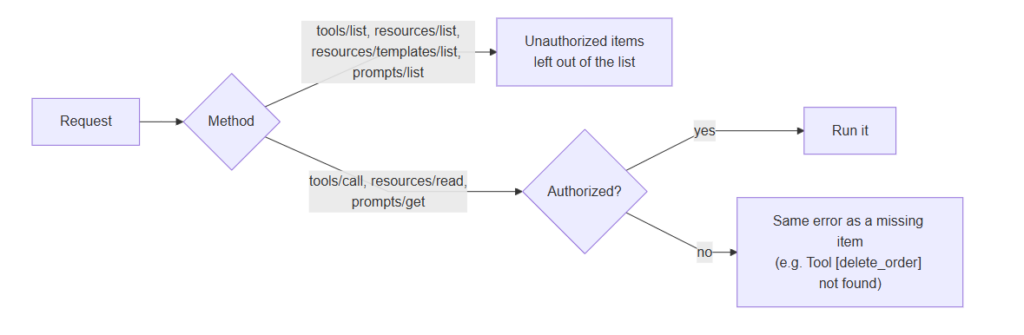
Two choices are worth noting:
- A denied item looks like a missing one. A client that is not allowed to call
delete_ordergets exactly the error it would get if the tool did not exist, so the server does not reveal what it hides. The real reason (the scopes required and the scopes the token carried) goes to the server log. - The check is fail-closed. A caller without a token, such as a STDIO client or any client of a server with no authentication configured, cannot see or use any item that requires a scope.
Registering without attributes
Classes registered programmatically — for example from C++Builder, which cannot carry Delphi attributes — get the same protection with RequireScope, on the tool builder or, after registration, on the section that holds the item:
|
1 2 3 4 5 6 7 8 9 10 11 12 |
FJRPCServer.Plugin.Configure<IMCPConfig> .Tools .RegisterTool(TOrderService, 'DeleteOrder', 'delete_order', 'Deletes an order') .WithParam('AId', 'id', 'Order id') .RequireScope('orders:write') .EndTool .RequireScope('list_orders', 'orders:read') .BackToMCP .Resources .RequireScope('res://orders/{id}', 'orders:read') .BackToMCP .ApplyConfig; |
RequireScope always adds to the scopes already declared, and attributes found on a class are honored even when it is registered programmatically, so registering a class by hand never drops its restrictions.
How to create custom rules for an MCP server
Scopes are the recommended way, but not the only one. With SetAuthorizer you replace the default check with your own rule. It is called for every item of a list and for the item a call asks for, and returns True to allow access. It receives the request context, a description of the item (its kind, name, uri, declared scopes and tags) and the caller’s identity, which is never nil.
A custom rule replaces the default one, so to keep the scope check and add to it, call TMCPScopeAuthorizer.Check first. Tags make it easy to mark items for your own rules without new attributes:
|
1 2 3 4 5 6 7 8 9 10 11 12 13 14 15 16 |
uses MCPConnect.MCP.Authorization; FJRPCServer.Plugin.Configure<IMCPConfig> .Security .SetAuthorizer( function (AContext: TJRPCContext; const AItem: TMCPAuthItem; AIdentity: TMCPAccessToken): Boolean begin Result := TMCPScopeAuthorizer.Check(AItem, AIdentity); // Tools tagged "admin", e.g. [McpTool('purge', 'Purges the archive', 'admin')] if Result and AItem.Tags.Exists('admin') then Result := AdminRepository.IsAdmin(AIdentity.Subject); end) .BackToMCP .ApplyConfig; |
The usual rules apply: the function is called concurrently from every request thread and must be thread-safe, and an exception raised inside it is logged and counts as a denial. From C++Builder, register a class implementing IMCPAuthorizer with SetAuthorizerClass; one instance is created per request, not per item.
Summary of creating and testing an MCP server with authorization
The right security setup for an MCP server follows from its transport and from who uses it:
- STDIO: keep credentials out of the command line; prefer environment variables or DPAPI-sealed configuration files.
- HTTP, callers can be given a key: require an API key, so the server is not open to anyone who can reach it. Use a single shared secret for the simplest case, or a validator to check keys against your own store and tell callers apart.
- HTTP, users log in with their own account: use OAuth 2.1 as a resource server backed by an external identity provider, and validate tokens with
TJoseTokenValidator. - Either way, the caller’s identity reaches your tools as a
TMCPAccessTokenthrough[Context]. - Deciding what each caller can access: declare the required scopes with
McpRequiredScope(orRequireScope), and switch to a custom authorizer only when scopes are not enough. - Browser-based clients: enable CORS, whichever authentication you use.
Each mechanism is configured through the same fluent plugin pattern shown above, so you can start simple and add stronger authentication as your deployment changes.
Further reading
- MCPConnect authentication and CORS: https://mcpconnect.delphiblocks.dev/authentication.html
- MCPConnect OAuth 2.1: https://mcpconnect.delphiblocks.dev/oauth.html
- FireLinkMCP (credential handling in practice): https://github.com/delphi-blocks/FireLinkMCP
This is a guest blog post by MVPs Paolo Rossi and Luca Minuti, creators of MCP Connect.



Reduce development time and get to market faster with RAD Studio, Delphi, or C++Builder.
Design. Code. Compile. Deploy.
Free Delphi Community Edition Free C++Builder Community Edition


