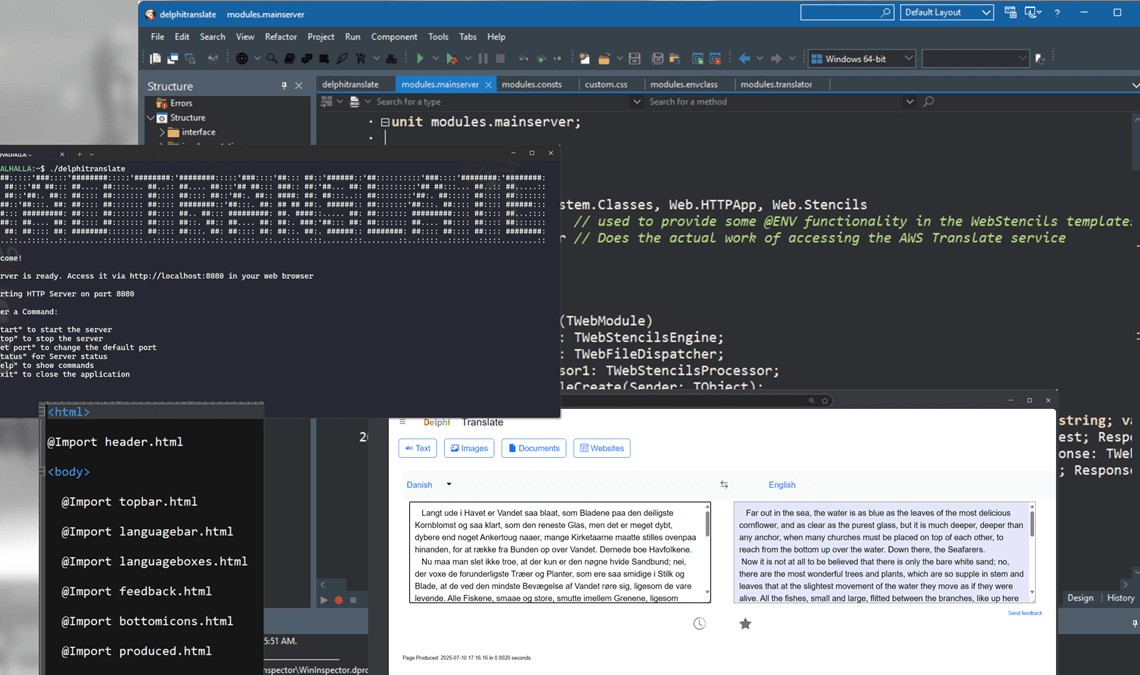
There’s a lot of heavy excitement about AI in the tech industry. Many people seem to be of the opinion that AI is a relatively recent thing, evolving perhaps in the last couple of years. But the reality is artificial intelligence of one type, or another has been around for much longer than you’d imagine. One of those long-lived stealthy AI apps is the incredibly useful Google Translate. Amazingly, it’s been helping us understand each other since 2006! I am a big fan of Google and their products. I am pretty sure I’m not alone either since, at the time of writing, they are reportedly worth $2.1 trillion USD. It’s easy to forget in these fast-moving times that Google was, and frequently still is, ground-breaking, and when Google Translate was released it represented a huge triumph of software engineering that seemed to work by magic. Times change though and did you know you can create your own super-smart translation tool that emulates much of that original magic? And it’s so easy you can do it in the time it takes to have a lunchbreak!
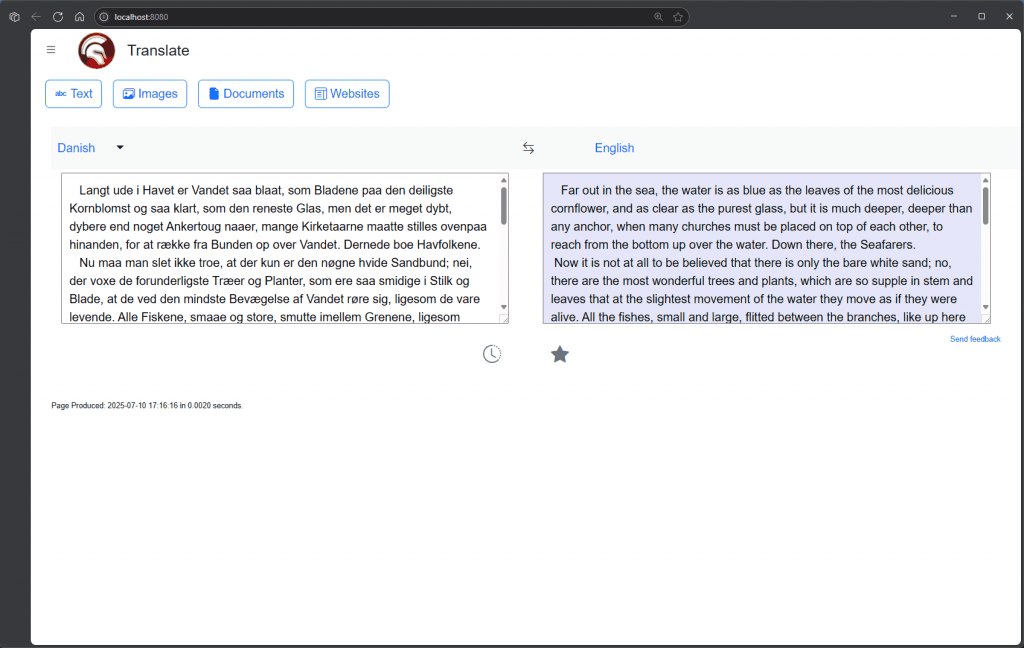
Table of Contents
Before we start – this is an educational post
Just to be clear – so you and, especially, I, do not draw the attention of trillion-dollar lawyers – this post and code is to demonstrate some of the web development and coding techniques you could use to emulate some of the functionality of Google Translate. The challenges Google’s devs solved back in 2006 were far greater than the ones we all face today. They were, and likely still are, geniuses. They came up with a web tool which quite literally helped people across the world understand each other better by translating text, web pages, and images – and they first did this at a time when things like LLMs, ChatGPT, and the like were not only unavailable they were also a long way off from becoming the reality they are now.
This article and the example code shows you how to create dynamic web content and leverage artificial intelligence which auto translates text in a way which is similar to Google Translate to show one way it can be done with RAD Studio and Delphi. The original Google team thought up how to make this kind of thing work, at massive scale and I want to be clear you should not infringe any of their trademarks, software patents, and other IP. They use their own technology behind the scenes and on the Google Translate pages all of which belongs to them. But that doesn’t mean we can’t learn some user interaction and web design with them as the inspiration. If you go on to use ideas from this article in a product or similar, as with any software development, do your due diligence and make sure to get professional advice to check you’re not infringing any patents or other similar legal requirements.
What tools were used to create the Delphi translate AI web application?
I used:
- RAD Studio 12.3 with Delphi (of course!)
- The absolutely fantastic WebStencils – my favorite feature of RAD Studio Athens.
- HTMX to drive dynamic web content and functionality in an almost JavaScript-free way.
- Google’s Bootstrap framework to make things look pretty and be responsive
- The Amazon AWS Components from Appercept to get rock-solid AI translation of text with only a few lines of code
- UltraEdit to edit the WebStencils templates
- The Delphi project uses WebBroker to serve up the pages. It works on Windows, macOS, and Linux.

Breaking down the structure of our web page
Remember, we’re not trying to make an exact copy Google Translate. So, here’s a schematic of what our finished Delphi Translate web app will look like.
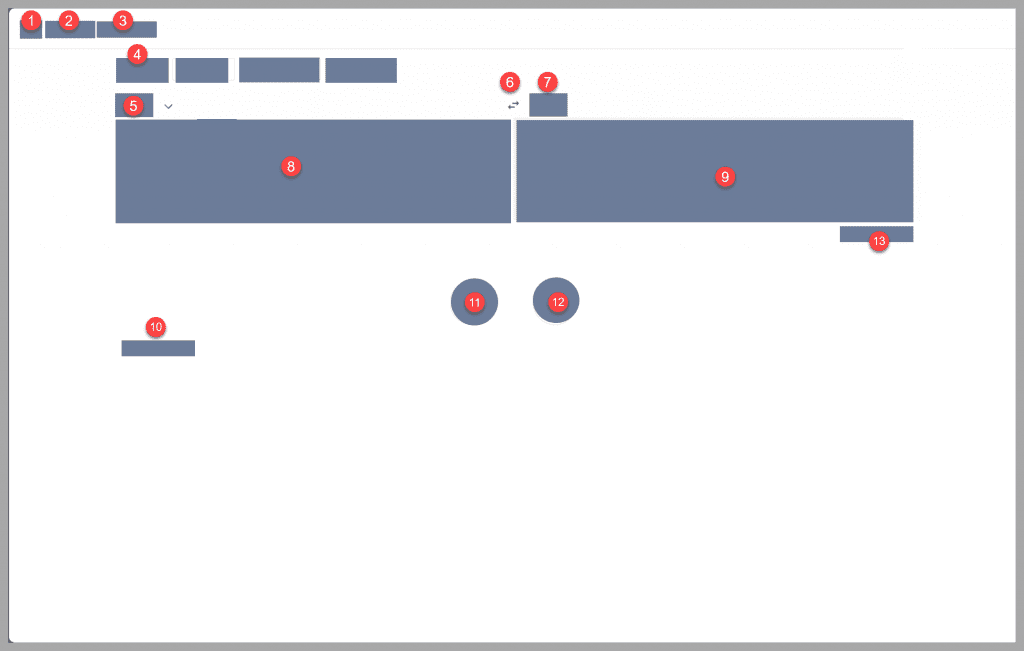
| Items |
|---|
| 1. Menu bar (doesn’t actually show the menu – just swaps the logos to show how it can be done) |
| 2. Logo |
| 3. Web app title |
| 4. Translate text button (the images, documents, and websites buttons are non-functional) |
| 5. Language selection / detected language drop down |
| 6. Swap original and translated text boxes |
| 7. Target language (fixed to English) |
| 8. Original (non-English) text box |
| 9. Translated text box – the AI translation of the original text appears here |
| 10. “Produced on” text – showing how long it took to display the page (original Google site doesn’t do this) |
| 11. History button (non-functional) |
| 12. Saved/Favorites button (non-functional) |
| 13. “Send feedback” text (non-functional link to “#”) |
What are some of the tricks used in the Delphi Translate web page?
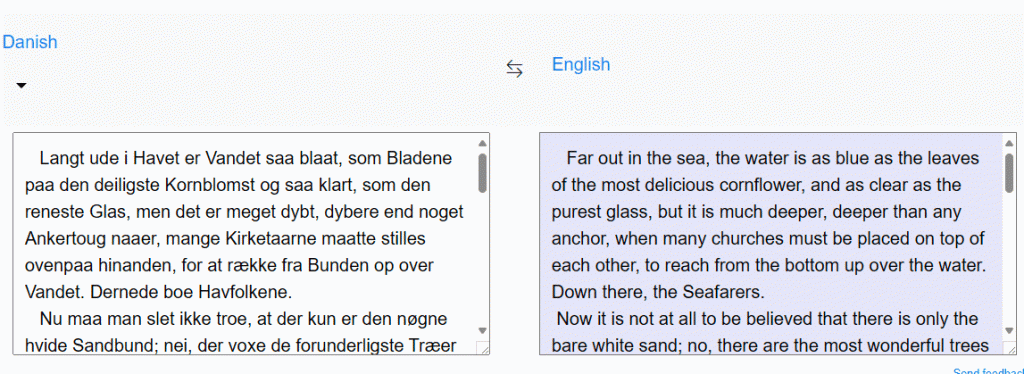
The page has a button (number 6 on the diagram) that swaps the contents of the original untranslated text and translated results. It’s a cool trick made possible using some HTMX code.
The Delphi code looks like this.
|
1 2 3 4 5 6 7 8 9 10 11 12 13 14 15 16 17 18 19 20 21 22 |
procedure TWebModule1.WebModule1SwapActionAction(Sender: TObject; Request: TWebRequest; Response: TWebResponse; var Handled: Boolean); begin // // This method swaps the original and translated content boxes around by using an HTMX field // // It is more 'correct' and extensible to actually do this by choosing alternate // external templates rather than using this hard-coded constants, but I wanted to // show the flexibility of the WebStencils engine and that it's TRUE Delphi // power behind it. // If there is already something in the text area, we preserve it when we // swap the content var LOGContent: string := Request.ContentFields.Values['ogcontent']; var LTranslatedContent: string := Request.ContentFields.Values['transcontent']; if FIsSwapped then Response.Content := Format(cLangNormal, [LOGContent, LTranslatedContent]) else Response.Content := Format(cLangSwapped, [LTranslatedContent, LOGContent]); FIsSwapped := not FIsSwapped; Handled := True; end; |
If you look at the RAD Studio Delphi project, you’ll see a unit called modules.consts which contains the HTML we send back. It uses the hx-swap keyword to make the magic happen. That triggers a call to our WebBroker app with a URL of /swap which triggers an action in the WebBroker code:
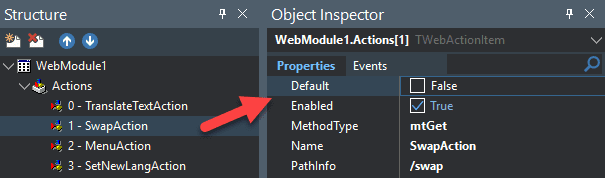
The Delphi code for the action – shown above – checks some flags and sends back a response with the two text boxes swapped around. It’s a pretty cool effect and demonstrates how to make substantial changes to the HTML page and DOM without forcing a whole redraw of the browser page. It also shows how to store context for session.
I had to use some JavaScript!
It feels wrong. 😉 On Google’s translate page they allow you to either type in text to get it translated, or you can simply paste in text from the clipboard. Since this is an entirely browser-based function we have to detect the clipboard paste event in the webpage, not server-side in the WebBroker app. There are a few ways to do it but the easiest way is to use some custom JavaScript.
This is the code I used to detect the clipboard paste event on the browser page:
|
1 2 3 4 5 6 7 8 9 10 11 12 13 14 15 16 17 18 19 20 |
<script> function handlePaste() { const mytextarea = document.getElementById('originalcontent'); mytextarea.addEventListener('paste', async (event) => { try { // Read text from clipboard const pastedText = await navigator.clipboard.readText(); // Process the pasted text (e.g., log it or update the textarea) document.getElementsByName('translatebutton')[0].click(); } catch (err) { console.error('Failed to read clipboard: ', err); } }); } // attach the event for the first time handlePaste(); </script> |
When the user pastes some text into the text box the JavaScript ‘clicks’ on the translate button. One quirk of using HTMX is that if you use hx-swap (which we do) it makes any custom JavaScript events detach. So we have to reattach them. We do that with htmx event keywords.
|
1 |
<div id="langs" name="langboxes" hx-on:htmx:after-swap="handlePaste();" > |
How to get text translated by AI?
To get the non-English text translated we use Appercept’s AWS components to call AWS Translate to do the AI-assisted translation. Appercept’s AWS library is a marvel of clean code and supreme software engineering skills. The library is rock-solid and written by an Amazon AWS specialist and it has a load of extra best-in-class functionality going on ‘under the hood’ which deals with all the intricacies of things like certificates, handshakes, retries and so on so, for you, it ‘just works’. Weirdly enough getting the text translated by AWS Translate using Appercept’s AWS library was by far the easiest part of the process. Eleven lines of code! If you have a RAD Studio Enterprise license or above you probably already have access to the Embarcadero version of the Appercept AWS library included for free. Appercept sell a pro version and have a ton of AWS examples too.
|
1 2 3 4 5 6 7 8 9 10 11 12 13 14 15 16 17 |
function TTranslationManager.TranslateString(const OriginalText: string): string; var LRequest: ITranslateTranslateTextRequest; LResponse: ITranslateTranslateTextResponse; begin LRequest := TTranslateTranslateTextRequest.Create(FSourceLanguageCode, FTargetLanguageCode, OriginalText); LResponse := FClient.TranslateText(LRequest); FTranslationSuccessful := LResponse.IsSuccessful; if FTranslationSuccessful then begin if FSourceLanguageCode.Equals(cTransAuto) then FDetectedLanguageCode := LResponse.SourceLanguageCode; Result := LResponse.TranslatedText; end else // if it failed, set the result to be the original text Result := OriginalText; end; |
Other key points in the Delphi Translate AI web application
There are a lot of other tips and techniques to look at in the Delphi Translate app to get yourself up to speed with modern web development using RAD Studio and Delphi. For example, the list of languages is created dynamically since Amazon are adding to them all the time. There are a couple of ways to handle this dynamic content. In theory we could do it all just using WebStencils’ comprehensive set of loop controls and variables, but I chose to do it within the WebBroker app itself just to highlight another way Delphi can put out dynamic web content. We even dynamically render a tick next to the currently active source language. This tick moves to place itself next to the detected source language and the “automatic’ word is updated when the non-English text is successfully translated.

RAD Studio WebStencils makes dynamic web pages really easy
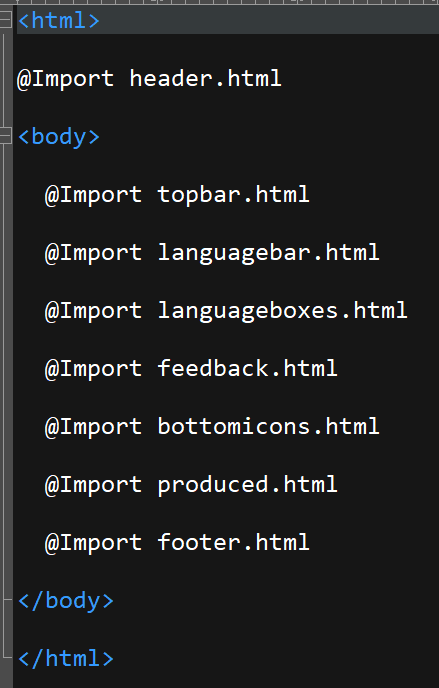
This is the web template for the main Delphi translate page. It’s pretty easy to follow.
How fast is WebBroker?
Google has always shown a count of approximately how many search results they returned for any given query along with how quickly they retrieved the results. It’s a proper tech flex. I added a little flex of our own to my dynamic Delphi web page.

That’s pretty fast – and that included a call to Amazon’s AWS to get the list of available languages it can translate. As I’ve said before, RAD Studio with Delphi is awesome and can do pretty much anything you need it to, and it will be rock solid reliable with extreme performance that is hard to beat.
Where is the webinar replay about creating the Delphi translate WebStencils and HTMX dynamic web app?
Here is the original webinar replay.
Where can I get the code for the Delphi Translate app?
You can find the code on this GitHub repository: https://github.com/checkdigits/delphitranslate – make sure you have installed the Appercept AWS controls and have configured your Amazon AWS account to allow you to use the AWS Translate function or it’s not going to work. Note that I will be ‘tweaking’ some of the code to use in an upcoming demonstration so you might find it changes – star the repo and get notified when I update it.
There is more coming on using WebStencils, HTMX, and AI. I am currently in the middle of preparing a course on Embarcadero Academy. We ran a promotion at the end of June which allowed some people to access the course for free – it’s coming soon!

Why not download a free trial of RAD Studio today and see why we think it’s the fastest, easiest, and most efficient way to create cross platform apps that work on Windows, macOS, Linux, iOS and Android from a single code base?



Reduce development time and get to market faster with RAD Studio, Delphi, or C++Builder.
Design. Code. Compile. Deploy.
Free Delphi Community Edition Free C++Builder Community Edition