
A collection of IDE changes that are small individually but visible in daily use.
Feature Preview: This blog post is based on a pre-release version of the RAD Studio software and it has been written with specific permission by Embarcadero. No feature is committed until the product GA release.
For the coming release of RAD Studio, outside of the work on integrating Navigator and its Minimap, the team has made several smaller improvements and addressed a number of long standing issues and annoyances, which collectively bring a better experience to the IDE. In this post, I want to collect several improved areas across the code editor, designers, Object Inspector, file handling, and IDE Insight.
These are the changes people tend to notice because they sit in the path of ordinary work. They also tend to be difficult to summarize with one headline, so let’s look at them by area.
Table of Contents
Files, Forms, and Designer Hints
A new Reload Open Modules command reloads files that have changed on disk. This is useful after a branch switch, a code-generation step, or an edit made by another tool.
We have also improved form inheritance when the IDE runs in High DPI mode and made it easier to open the inherited base form from the designer.
Designer hints for VCL controls now show more useful information. FireMonkey viewers have received additional High DPI work as well. This is my preferred small new feature of the entire release.
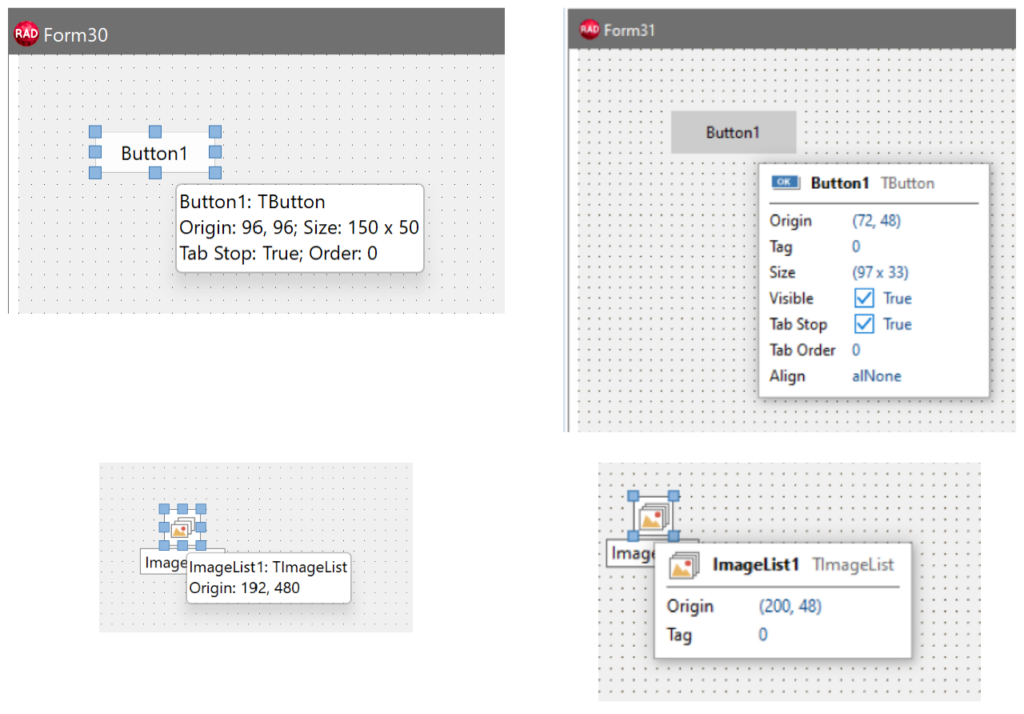
The old designer hints (on the left) and the new ones (on the right)
Editing Code
Brace matching has been improved so braces inside strings and comments no longer confuse the editor. We have also corrected a group of code-insertion problems in files using Linux line endings. These could place generated or refactored code one character away from the intended position; the fixes cover roughly 20 related customer reports.
C++ syntax highlighting now recognizes more C++11 forms, including binary literals, numeric separators, and raw string literals. None of these changes alters the compiler, but the editor should represent the source more accurately while you work.
Object Inspector and IDE Insight
The Object Inspector no longer imposes the old 2,000-character limit on string properties. Collection items with longer string values also get a multiline editor, which is much more practical than editing a large value in a single line.
IDE Insight has received changes to its options, rendering, and the way it reports that there are no matching results. We have also continued work on placing the main menu in the title bar and on displaying keyboard shortcuts using clearer key-cap styling.
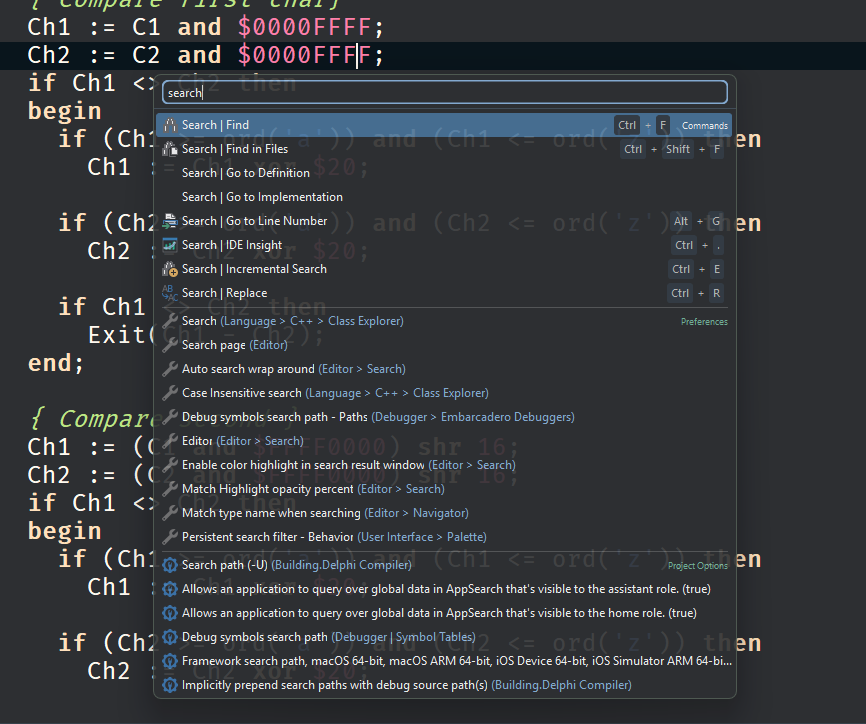
The “modern” version of IDE Insight displayed in a screen centered dialog.
Notice also the new look (“key-cap styling”) of the shortcut keys in the menu items and in IDE insight
Improving Everyday Work
A target platform or a new control is easy to identify as a feature. But the quality and usability of an IDE also depends on addressing the little points of friction developers encounter many times a day. Reliable code insertion, correct brace matching, and editing long string properties do not require you to change your application code or consider a new target platform. They simply let the IDE get out of the way. I’m quite sure Delphi and C++Builder developers will appreciate these small improvements, including some long-awaited ones.
Feature Preview: This blog post is based on a pre-release version of the RAD Studio software and it has been written with specific permission by Embarcadero. No feature is committed until the product GA release.


Reduce development time and get to market faster with RAD Studio, Delphi, or C++Builder.
Design. Code. Compile. Deploy.
Free Delphi Community Edition Free C++Builder Community Edition