



Legacy systems are not being replaced; they are being upgraded into intelligent vertical SaaS platforms. Many industry leaders cannot afford a rip-and-replace migration. The real work happens inside the apps already running the business. That is why modernizing legacy systems for industry cloud platforms matters now. The shift brings together legacy modernization, industry cloud platforms, embedded AI agents, and native cross-platform development. In regulated sectors, the winning path is not a browser rewrite with generic workflows. It is a controlled move from desktop and mobile systems into vertical SaaS that fits the domain.
Embarcadero sits in that lane with real enterprise credibility. Fortune 100 companies rely on software built with Embarcadero tools, and that matters when uptime, auditability, and long asset life are part of the brief. RAD Studio, Delphi, C++Builder, InterBase, and RAD Server give teams a route that keeps core business logic intact while adding modern UI, service layers, and AI-ready architecture.
Table of Contents
What this article will cover
This article covers how RAD Studio helps modernize legacy desktop and mobile systems into vertical SaaS. It also shows why embedded AI logic matters more than standalone chatbot UIs. It maps Gartner’s AI agent thinking to Delphi and Object Pascal, and it shows where InterBase and RAD Server fit in the stack. For teams shipping software in healthcare, finance, logistics, manufacturing, or government, that architecture choice is the difference between a clean upgrade and a costly rewrite.
Modernizing legacy systems is now an industry cloud platform problem, not just a codebase problem
The failure of generic SaaS in regulated and operationally complex industries
Generic SaaS often fails in healthcare, finance, manufacturing, logistics, and government because these fields run on constraints, not templates. They need domain-specific workflows, offline operation, low latency, strong data control, and deep links to on-prem systems. A horizontal platform can look good in a demo and still miss the daily work. Staff need forms that match policy, field apps that keep working without signal, and logic that respects local rules.
That is why vertical SaaS keeps gaining ground. It maps software to a specific industry and its operational rules. A claims app, a dispatch app, and a plant maintenance app do not share the same shape. They should not be forced into one.
Embedded applications still dominate operational workflows
Desktop and mobile apps remain the true system of action in many enterprises. The browser is often the presentation layer. The real work lives in thick clients, mobile field tools, and connected desktop apps tied to existing data stores. Modernizing those apps often delivers more value than rebuilding everything for the web.
These systems already speak to databases, APIs, and on-prem services. That makes them a strong base for native app modernization. Gartner’s work on AI agents and enterprise software trends points in the same direction, and Embarcadero’s product line fits that practical reality well. See the Gartner research on AI agents and enterprise software trends and the Embarcadero RAD Studio product overview.
Why RAD Studio is uniquely positioned for vertical SaaS modernization
Native, cross-platform development from one codebase
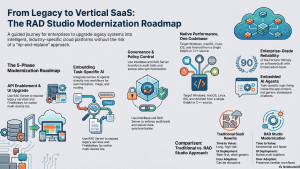
RAD Studio targets Windows, macOS, Linux, iOS, and Android from one codebase. That matters when a legacy Delphi or C++Builder system needs to move onto multiple form factors without losing native behavior. A field app can stay fast on Android. A trading or back-office app can stay responsive on Windows. A management tool can move to macOS or Linux when needed.
Delphi and C++Builder also help mixed-language teams. Many shops have core logic in Delphi and lower-level modules in C++. RAD Studio lets both groups work in one toolchain. That lowers churn and keeps modernization practical.
Enterprise-grade building blocks that map to the realities of modernizing legacy systems
The stack lines up well with enterprise work.
- InterBase overview gives embedded, encrypted, sync-capable data storage.
- RAD Server overview gives REST APIs and backend services for connected apps.
- RAD Studio overview ties client, server, and data work together.
- Python integration libraries help connect to data science, model calls, and AI glue code.
That mix suits industry cloud platforms because it keeps control in your hands. It also keeps the app portable. You can run local, cloud, and hybrid patterns without throwing out the old system.
Gartner’s AI agent prediction and what it really means for enterprise software teams
From copilots to task-specific agents
The useful AI shift is not the chat window. It is the task-specific agent that performs one narrow workflow well. Think intake summary, anomaly triage, route exception handling, or maintenance recommendation. Those are repeatable jobs with clear inputs and outputs. They fit software architecture far better than a general-purpose assistant hanging off the side of the UI.
Gartner’s 2026 direction on AI agents matters because it changes how teams build enterprise software. The winning apps are not AI-first in the UI. They are AI-embedded in workflow. The AI sits inside the business process, not above it.
Why task-specific agents fit Delphi and Object Pascal systems well
Delphi and Object Pascal suit this model because the code is strongly typed and predictable. That makes agent logic easier to contain, test, and audit. Agent actions can sit in service units, modules, and event-driven flows. A narrow agent that classifies a support case or drafts a compliance note can run as a controlled part of the system, not as a loose script.
That matters in regulated fields. Governance, audit trails, and clear execution paths are easier when the logic is explicit. See Embarcadero’s AI Leapfrog: Why On-Prem Software May Win the Agentic Era.
How to embed AI logic into desktop and mobile apps built with RAD Studio
Architecture pattern: UI + domain logic + AI orchestration
A practical pattern looks like this.
- Client app in Delphi or C++Builder
- Backend services through RAD Server
- Data in InterBase or external systems
- AI orchestration through APIs, local models, or hybrid gateways
The UI should not do all the thinking. It should present context, capture intent, and show results. Business rules stay in domain code. AI handles classification, summarization, suggestion, and routing. That keeps the system understandable.
Implementation approaches for Delphi/Object Pascal teams
Teams can call cloud AI APIs from a RAD Studio client when the policy allows it. They can also use RAD Server as an AI gateway, so the client never talks to model services directly. That gives a clean place for auth, logging, rate limits, and rule checks.
A common pattern is to combine AI output with rule engines. If the model suggests a high-risk action, the app can require human approval. That is a good fit for finance, healthcare, and public sector work.
Event-driven UI updates matter too. Server-Sent Events can push status changes into the app without constant polling. See Embarcadero’s Server-Sent Events article. For model access, the OpenAI API docs and Anthropic API docs are useful references when policy permits cloud calls.
Practical use cases for task-specific AI agents in vertical SaaS
Industry scenarios where embedded agents deliver immediate value
In healthcare, agents can summarize intake notes and surface missing data. In finance, they can triage compliance alerts and explain anomalies. In manufacturing, they can recommend maintenance and forecast parts needs. In logistics, they can handle route exceptions and dispatch changes. In field service, they can guide technicians and retrieve knowledge tied to the current job.
These are not generic chatbot tasks. They are workflow tasks. They fit the user screen and the record in front of the operator.
Why these agents must live inside the app
Context comes from the current form, the active case, and the live workflow state. AI gets more useful when it reads business data already on screen and can act on it. The app then becomes the agent’s interface, not just a display surface. That is where vertical SaaS gets its edge.
Table 1 – RAD Studio modernization stack vs. typical SaaS rewrite approach
Comparative architecture summary
| Dimension | Traditional SaaS Rewrite | RAD Studio Modernization Approach |
| Time to value | Long, high-risk | Incremental and faster |
| UI deployment | Web-first, often generic | Native Windows/macOS/Linux/iOS/Android |
| Legacy integration | Often complex and costly | Strong fit for existing databases and services |
| AI integration | Usually external and bolted on | Embedded in workflow via RAD Server/client logic |
| Compliance/auditability | Depends on platform | Strong fit for controlled enterprise environments |
| User adoption | Can be disruptive | Preserves familiar workflows while modernizing |
InterBase and RAD Server as the backbone of governed vertical SaaS
InterBase for embedded data, sync, and resilience
InterBase fits mobile and edge scenarios where the app must keep working offline. It supports embedded storage, encryption, disaster recovery, and synchronization. That makes it useful for field apps, plant-floor tools, and distributed enterprise systems where local persistence matters.
It also reduces the need to stitch together many third-party components. For teams modernizing legacy systems for industry cloud platforms, that kind of control is valuable.
RAD Server for API orchestration and AI agent governance
RAD Server exposes business logic as services. It can sit between the UI and the AI layer. That gives one place to enforce permissions, track actions, and mediate requests to model APIs or local inference services.
This middle layer matters. It gives auditability. It keeps policy checks in one place. It also lets the app send structured requests instead of raw prompts. That is a better fit for governed enterprise work.
See the InterBase 15 documentation and RAD Server documentation.
Modernizing legacy systems without breaking what already works
Incremental modernization strategy for Delphi and C++Builder codebases
Do not rewrite the whole system. Refactor in layers. Keep core business logic stable. Modernize the UI, connectivity, and intelligence around it. A strangler-fig pattern works well here. So does side-by-side modernization, where the new client talks to the old system through a service layer.
That reduces risk and keeps release cycles moving. It also lets teams ship useful changes while the larger platform work continues.
What to modernize first
Start with high-value screens and flows.
- Evaluate third-party components and libraries
- Reporting screens
- Exception handling workflows
- Mobile field workflows
- Data entry forms
- Decision support dialogs
These are the best places for AI augmentation and UI cleanup when modernizing legacy systems. They touch daily work. They also reveal where the old system slows people down. Fix those first, and users notice.
Table 2 – Recommended roadmap to modernizing legacy systems for RAD Studio teams
| Phase | Goal | RAD Studio Role | AI Role |
| 1. Assessment | Map legacy workflows and bottlenecks | Inventory existing Delphi/C++Builder assets | Identify automation candidates |
| 2. API enablement | Expose services from old systems | RAD Server facade layer | Agent consumes structured services |
| 3. UI modernization | Improve desktop/mobile UX | FireMonkey/native client upgrades | Contextual in-app assistance |
| 4. Embedded intelligence | Add task-specific agents | Client-side orchestration + service calls | Suggest, classify, summarize, route |
| 5. Governance | Track and control behavior | InterBase/RAD Server controls | Policy-aware agent execution |
Why this approach to modernizing legacy systems resonates with Embarcadero users and enterprise buyers
Trusted technology for companies that cannot afford platform churn
Software built using Embarcadero tools already runs in places where failure is expensive or unforgivable. That includes Pfizer, Toyota, UPS, Western Union, Nokia, Barclays, Canon, and Dell. Those names tell a simple story. Teams trust these tools where reliability matters.
The appeal is not hype. It is continuity. You keep a toolchain that has shipped real systems for years. You add modern UI, service layers, and AI logic without throwing away the base.
The business case for staying close to the metal when modernizing legacy systems
Native apps stay fast and responsive. They also stay easier to reason about than large web rewrites built from many moving parts. Teams keep better control over data, deployment, and AI behavior. That matters when the app sits near money, health, operations, or regulated records.
Modernizing legacy systems – The future of vertical SaaS is embedded, governed, and intelligent
The core argument
Modernizing legacy systems for industry cloud platforms starts with what already works. Legacy apps are not obsolete. They are the base for vertical SaaS modernization. RAD Studio gives teams a native, cross-platform path. InterBase and RAD Server give that path a secure, governed foundation. Task-specific AI agents fit best when they sit inside app workflows, where the real work happens.
Modernizing legacy systems – how to start
Pick one legacy workflow and prototype one embedded AI agent. Start small. Keep the logic narrow. Then wire it into the existing Delphi or C++Builder app with RAD Studio, InterBase, and RAD Server. Related Embarcadero material on auditability, compliance-ready applications, and on-prem agentic AI strategy offers a strong next step for teams that need to ship with control.
Further Reading
Software Auditability is Security: Build Software You Can Prove
Compliance-Ready Applications for Regulated Software Teams With Delphi
RAD Studio vs Low-Code for Enterprise Applications: The Pro-Code Advantage
Reduce development time and get to market faster with RAD Studio, Delphi, or C++Builder.
Design. Code. Compile. Deploy.
Free Delphi Community Edition Free C++Builder Community Edition


