



Table of Contents
Introduction – Why “Fast Enough” Is Not Enough for Enterprise Software
Enterprise teams are under pressure from every side. Business leaders want software shipped faster. Security teams want tighter control. Architects want code that can last. Users want speed, stability, and clean UI/UX. That mix is hard to satisfy with tools that only optimize for quick screens and simple workflows. That is where the RAD Studio vs low-code for enterprise applications debate gets real. Low-code is useful for prototypes and small internal tools. But once an app becomes mission-critical, speed alone is not enough. Enterprises need speed plus control, visual productivity plus native performance, and abstraction without giving up ownership.
RAD Studio sits in that middle ground. Delphi and C++Builder give teams visual development and fast iteration, while still producing native code. InterBase and RAD Server add data and API layers that fit enterprise needs without forcing a separate stack.
Embarcadero also has a long track record in serious enterprise environments. Its customer stories and industry pages show that Fortune 100 companies and global brands rely on software built with these tools.
RAD Studio vs Low-Code: The Promise vs The Enterprise Reality
Where Low-Code Helps, and Where It Breaks Down
Low-code platforms are popular for good reasons. They speed up UI assembly. They reduce the need for specialist developers. They help teams ship simple forms, approval flows, and lightweight internal apps fast.
But the tradeoffs show up quickly in larger systems. Architectural control is limited. Vendor lock-in can be high. Complex business logic gets awkward. Debugging is often tied to the platform. Testing can be less transparent. Portability and extensibility often depend on what the vendor allows.
That is fine for a demo. It is less fine for a payroll system, a regulated portal, or a factory plant-floor dashboard.
Why Scalable Systems Demand More Than Drag-and-Drop
Enterprise software has to live through growth, regulation, integration sprawl, and process change. It must connect to older systems and new services. It must keep working when traffic spikes or workflows change.
Once an app becomes critical, teams need source-level visibility, fine-grained tuning, and long-term maintainability. Closed abstractions make that harder. A pro-code stack gives teams room to build the architecture that fits the business, not the other way around.
For a neutral view on low-code limits, Gartner’s coverage of enterprise low-code application platforms is a useful starting point. The message is consistent across the market. Low-code helps with speed, but control still matters.
RAD Studio vs Low-Code: RAD Studio as the Pro-Code Alternative That Keeps Enterprise Control
Visual Productivity Without Giving Up Native Compilation
RAD Studio keeps the main benefit people like in low-code, fast UI work, but it does not trap teams in a closed layer. Delphi and C++Builder support visual development, reusable components, and quick iteration. The key difference is simple: they compile to native binaries.
That matters in daily work. Native compilation usually means better performance, lower runtime overhead, stronger OS integration, and clearer deployment control. It also helps teams ship software that behaves like real desktop and mobile software, not like a wrapped web app pretending to be native. Even Microsoft has recently acknowledged this fact and encourages developers to swap to producing native code, especially where security, speed, and robustness count.
If you want the product view straight from the source, the RAD Studio page explains the multi-platform native app model. Delphi’s product page and C++Builder’s product page go deeper on native development.
One Codebase, Multiple Platforms, Real Engineering Ownership
RAD Studio supports Windows, macOS, Linux, iOS, and Android from a single codebase. That matters for enterprise teams that still support desktop users, but also need mobile reach and modern deployment choices.
A single codebase does not mean a single rigid design. Teams still shape the architecture, data flow, and deployment model. That is the point. Pro-code gives you the freedom to fit the system to the business. Low-code often asks the business to fit the platform.
Performance, Security, and Governance: Where Pro-Code Wins Long-Term
Native Apps Are Better Positioned for High-Performance Enterprise Workloads
Native compilation has a real edge when apps must respond fast. Manufacturing dashboards. Financial trading tools. Logistics tracking. Field service apps. Regulated client portals. These systems all need fast rendering, low overhead, and predictable behavior.
Low-code can be fine for forms and workflow screens. But many low-code tools optimize for delivery speed, not runtime efficiency. Once data volume grows or UI demands rise, native apps tend to age better under pressure.
That matters in enterprise software, because users do not care how quickly the first version shipped. They care whether the system still works when the workload grows.
RAD Studio vs Low-Code: Auditability, Compliance, and Maintainability Are Not Optional
Embarcadero has been pushing a clear message in recent content such as Software Auditability Is Security and Compliance-Ready Applications for Regulated Software Teams With Delphi. The point is practical. If you cannot inspect it, trace it, and test it, you cannot trust it for long.
That is where pro-code fits enterprise governance better than drag-and-drop tooling. Code can live in version control. Changes can be reviewed. Bugs can be debugged. Builds can be repeated. QA and DevOps workflows map naturally onto source code.
For secure development guidance, OWASP’s Software Assurance resources and NIST’s Secure Software Development Framework line up with the same idea. Traceable code beats opaque behavior.
How InterBase and RAD Server Extend the Enterprise Stack
InterBase for Embedded, Secure, and Cross-Device Data Handling
InterBase fits the kind of app that needs local data, strong control, and easy shipping. It supports embedded relational data, encryption, synchronization, and cross-device use. That makes it useful for offline-first field tools, distributed teams, and apps that cannot depend on constant network access.
A database that can live inside the application simplifies deployment. It also gives teams more control over data handling. That helps when governance matters and when a lighter footprint is useful.
See the official InterBase page for details on encryption, sync, and embeddability.
RAD Server for Instant API Enablement and Enterprise Integration
RAD Server gives Delphi and C++Builder teams a fast route to REST APIs and backend services. That matters when desktop, mobile, and cloud systems all need to talk to the same business logic.
It supports on-premise or cloud deployment, which is useful for mixed enterprise environments. It also cuts down the need to stitch together a separate platform just to expose APIs.
The RAD Server page shows how it fits API-first development. In practice, that means less glue code and a cleaner path from client app to backend service.
Comparison Table – RAD Studio vs Low-Code for Enterprise Development
| Capability | Low-Code Platforms | RAD Studio Pro-Code Stack |
| Speed to prototype | Very high | High |
| Native performance | Often limited | Strong, native compiled |
| Source code ownership | Limited or partial | Full ownership |
| Debugging and testing | Platform-dependent | Standard professional workflows |
| Custom architecture | Constrained | Fully flexible |
| Long-term scalability | Mixed | Strong |
| Security/compliance control | Varies by platform | Stronger governance and auditability |
| Platform lock-in | Often high | Lower, with code portability |
RAD Studio vs Low-Code: RAD Studio keeps the speed people want from visual tools, while preserving the control enterprises need. That is the real difference.
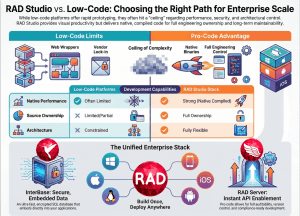
Table 2 – Best-Fit Use Cases for RAD Studio, Delphi, C++Builder, InterBase, and RAD Server
| Tool | Best Use Case | Enterprise Value |
| Delphi | Multi-platform native app development | Rapid delivery with strong runtime performance |
| C++Builder | High-performance Windows and cross-platform development | Native speed and modern C++ productivity |
| InterBase | Embedded or distributed secure data storage | Lightweight, encrypted, sync-friendly database |
| RAD Server | API-first backend services | Fast enterprise integration and deployment |
These tools work as one stack, not as isolated products. That is what makes Embarcadero practical for enterprise teams that want one path from UI to data to API.
Why Leading Companies Choose Embarcadero Tools for Mission-Critical Software
RAD Studio vs Low-Code: Enterprise Trust Comes from Longevity, Not Trends
Large companies do not pick tools because they are trendy. They pick tools that last. Finance, manufacturing, healthcare, logistics, and consumer electronics all depend on systems that keep running and keep changing safely.
The adoption of Embarcadero tools across large companies signals that the stack has lived long, and prospered in serious environments. Customer pages show that kind of adoption across sectors.
What These Companies Need Is What Low-Code Often Cannot Deliver
These teams need maintainable codebases. They need integration flexibility. They need performance. They need long lifecycle support. They also need tooling that fits established QA, source control, and release processes.
That is where low-code often hits a ceiling. It can speed up simple apps. It does less well when systems need to last, change, and stay governed.
Practical Takeaway – When to Choose RAD Studio Over Low-Code
Use low-code for disposable internal tools, simple forms, or quick workflow apps. Use RAD Studio when the software must be fast, native, secure, maintainable, and scalable.
That usually includes regulated environments, performance-sensitive systems, long-lived enterprise applications, and teams that need source control plus architecture freedom. It also includes companies that cannot accept platform lock-in as a tradeoff for speed.
When it comes to RAD Studio vs Low-Code, RAD Studio gives a cleaner answer than the pro-code vs low-code debate usually allows. It gives visual productivity without giving up engineering control. That is why it works for serious enterprise builds.
RAD Studio vs Low-Code: Pro-Code Is the Sustainable Path to Enterprise Scale
Low-code can help teams move fast. It just cannot carry every enterprise requirement on its own. When performance, governance, and flexibility matter, RAD Studio has the better shape for the job.
Delphi, C++Builder, InterBase, and RAD Server form a cohesive pro-code ecosystem. They give teams a path from native app development to data handling to API delivery, without forcing a closed platform model.
RAD Studio vs Low-Code: If your team needs low-code speed without low-code ceilings, explore RAD Studio and see how a pro-code stack can scale with your enterprise.



Reduce development time and get to market faster with RAD Studio, Delphi, or C++Builder.
Design. Code. Compile. Deploy.
Free Delphi Community Edition Free C++Builder Community Edition


