


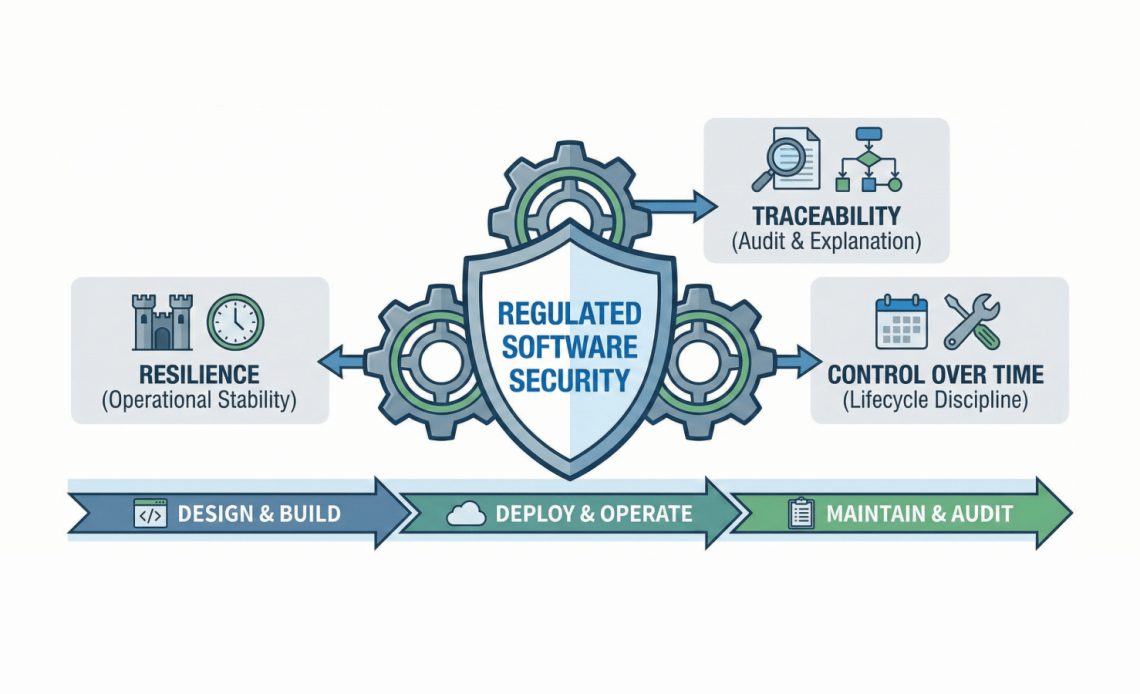
In regulated environments, the term “secure” implies the ability to run, explain, and change safely over time. That’s a very different bar than “we passed a pen test once” or “we use a safe framework.” If you build software for finance, healthcare, public sector, industrial, transport, or any environment where downtime, data mishandling, and uncontrolled change create real-world consequences, security is operational. It shows up in audits, incident postmortems, third-party reviews, and the everyday work of keeping systems stable for years. That’s the lens this article uses: regulated software security, operational security, secure-by-design, and lifecycle security.
Table of Contents
Regulated Software Security: Why It’s Different
Threat model includes audits, change control, and third-party risk, not just attackers
Most security conversations start with attackers. In regulated systems, the threat model is wider:
- Auditors and assessors asking you to prove what changed, when, why, and who approved it.
- Change control that treats “unplanned behavior” as a security incident, even if nobody exploited it.
- Third-party risk where a dependency update can be as disruptive (or risky) as an intrusion.
Regulators are also turning these expectations into enforceable requirements. In the EU financial sector, DORA focuses on ICT risk management and operational resilience, with the regulation applying from 17 January 2025. ( eiopa.europa.eu )
And the EU’s Cyber Resilience Act aims to raise baseline security expectations for products with digital elements, including security updates and clearer information for buyers. ( digital-strategy.ec.europa.eu )
You don’t have to operate in the EU to feel the shift. Procurement, insurance, and enterprise risk teams are already asking for the same proof: security isn’t just “features,” it’s how you build and run software.
The real failure mode: uncontrolled upgrades and dependency sprawl
In regulated systems, one of the most common failure patterns isn’t a Hollywood-style hack. It’s boring and expensive:
- A dependency update pulls in five more packages.
- A runtime upgrade changes behavior.
- A security patch breaks compatibility.
- A team can’t reproduce the exact build they shipped six months ago.
This is why “security-first” needs to include architecture and tooling choices that reduce hidden layers and reduce forced churn.
RAD Studio’s messaging leans into this with a simple framing: developers want control, performance, and productivity. They also want to avoid framework churn. From a security angle, less churn means fewer surprise changes, fewer emergency upgrades, and a cleaner story when someone asks, “What changed in production?”
A Practical Definition of Security
Security = resilience + traceability + control over time
Here’s the definition that maps cleanly to regulated reality:
Security = resilience + traceability + control over time.
- Resilience: the system keeps working, degrades safely, and recovers cleanly.
- Traceability: you can explain how it works, what changed, and why.
- Control over time: you can maintain it for 5–10+ years without gambling your production environment on constant upgrades.
This is “secure-by-design” in the practical sense: security as a lifecycle discipline, not a one-time checklist.
How this maps to engineering decisions (build system, runtime layers, logging)
Once you adopt that definition, security stops being a bolt-on and starts shaping core technical choices:
- Build system: Can you reproduce builds? Can you pin versions? Can you generate evidence for audits?
- Runtime layers: How many interpreters, VMs, embedded browsers, and “invisible” stacks are you shipping?
- Operational logging: Can you prove behavior without leaking sensitive data? Can you trace security-relevant events?
This aligns well with modern secure software guidance like the Secure Software Development Framework (SSDF) from NIST, which focuses on integrating secure practices into the SDLC rather than treating security as a separate activity. ( csrc.nist.gov )
And for web-facing systems, the Top 10 from OWASP remains a useful baseline for risks like broken access control and injection. ( owasp.org )
Regulated Software Security – The Lifecycle View
A lifecycle approach mirrors how regulated teams actually work: Design & Build, Deploy & Operate, Maintain & Audit.
Regulated Software Security – Design & Build (determinism, explicit control)
In regulated development, deterministic behavior and explicit control matter because they make systems explainable.
RAD Studio positions itself around fast development without losing control of the code. That’s not just a productivity claim, it’s a security claim, because black-box abstraction is hard to audit.
Concrete examples from the tooling and platform:
- True native compilation across targets is part of RAD Studio’s long-term value story, and native compilation is commonly tied to performance and security in regulated deployments.
- The product positioning also warns that scripted/hybrid approaches rely on runtime interpretation and additional runtimes (e.g., .NET/Java runtimes, embedded web runtimes), increasing overhead and creating extra security exposure.
- RAD Studio 13 ships with tooling improvements aimed at helping teams manage complexity (especially in large projects). For the authoritative release detail list, see the official “What’s New” page: What’s New in RAD Studio 13 Florence. ( embarcadero.com )
A security-minded build environment is also a version-control-minded environment. RAD Studio supports common source control flows and helps teams treat traceability as an everyday habit, not a once-a-year scramble.
Regulated Software Security – Deploy & Operate (predictable performance, minimal dependencies)
For regulated systems, “secure” includes predictable runtime behavior, stable deployment artifacts, and less dependency sprawl.
RAD Studio’s Windows deployment supports modern packaging patterns, including MSIX and signing workflows. Signed packages reduce tampering risk and make distribution governance easier.
On the server side, RAD Studio’s ecosystem includes RAD Server, and release materials highlight multi-tenancy patterns and API versioning options. These are useful when you must support old and new clients simultaneously and want clearer lifecycle boundaries. Start with the release overview here: RAD Studio 13 Florence release overview. ( embarcadero.com )
For web delivery, session/auth is a classic sharp edge. RAD Studio’s WebStencils updates include a session and authentication system (and related security-minded improvements). Reference: WebStencils updates in RAD Studio 13 Florence. ( blogs.embarcadero.com )
Finally, data access is one of the most frequent real-world breach paths. RAD Studio’s data layer messaging emphasizes safer query handling and common patterns to reduce SQL misuse risk, which maps directly to OWASP’s focus on injection prevention. ( owasp.org )
Regulated Software Security – Maintain & Audit (version support, reproducible builds)
Here’s the part many tool evaluations ignore: the most secure system today is the one you can still patch and audit in 7 years.
Security as a lifecycle discipline means the Maintain & Audit phase is about long-term support, backward compatibility, and reproducible builds. If you can’t reproduce what you shipped, you can’t confidently patch it, certify it, or explain it.
RAD Studio 13 adds a very practical mechanism for controlling change: GetIt package versioning, so teams can select specific versions rather than being forced onto the newest package. That’s not flashy, but it’s exactly how you reduce surprise behavior changes and keep audit evidence consistent. Reference: What’s New in RAD Studio 13 Florence. ( embarcadero.com )
Regulated Software Security – Where RAD Studio Fits
The positioning here is straightforward: RAD Studio as a secure development environment for long-lived, regulated systems, anchored on toolchain stability, explicit control, and reduced dependency sprawl.
Native compiled apps reduce reliance on interpreted runtimes
A big chunk of operational security is reducing hidden layers you don’t control. RAD Studio emphasizes true native compilation and predictable behavior.
That doesn’t mean “native is automatically secure.” It means the system can be simpler to reason about and easier to stabilize, two core properties of operational security.
Table: Two common deployment shapes and what they mean for operational security
| Dimension | Native compiled (fewer layers) | Runtime-heavy (more layers) |
| Attack surface | Smaller stack to patch and validate | More components to patch (VMs, embedded browsers, runtimes) |
| Change control | Fewer forced upgrades | More frequent upgrades driven by runtime security advisories |
| Audit evidence | Easier to map version → artifact | Harder to prove exact effective runtime versioning |
| Operational behavior | More predictable performance | More variance due to runtime behavior changes |
AI features can be kept aligned with IP policies
Many teams have IP and compliance constraints around AI, especially when code or data could leave controlled environments.
RAD Studio’s AI direction has been framed as optional: helpful for teams who want it, but not forced on teams who can’t adopt it due to policy constraints. That matters in regulated environments: a tool that requires cloud AI for core workflows can be a deal-breaker for secure development. With an optional approach, you can adopt AI assistance where it fits your policies rather than rewriting your governance model around vendor defaults.
For the official overview of AI direction and tooling in this release, start here: What’s New in RAD Studio 13 Florence. ( embarcadero.com )
“Security Beyond Features” Checklist
Here’s a practical “security beyond features” checklist that focuses on operational reality—change control, dependency inventory, audit logging, upgrade rehearsal.
Use this as a filter when you evaluate any IDE, framework, or platform:
- Change control discipline
- Can you ship updates with approvals, rollback plans, and reproducible artifacts?
- Dependency inventory
- Can you list what you ship (including transitive deps) and justify version choices?
- Upgrade rehearsal
- Can you patch a dependency or OS target without “surprise rebuild” chaos?
- Audit logging design
- Do you log security-relevant events in a way that supports investigations without leaking sensitive data?
- Runtime layer minimization
- Are you shipping stacks you don’t control (embedded browser runtimes, large scripting engines) without a patch plan?
- Data safety defaults
- Are your database access patterns designed to resist injection and misuse?
- Secure deployment artifacts
- Do you sign your builds, and can you prove provenance?
If you adopt the operational definition (resilience, traceability, control over time) you’ll notice a pattern: security becomes much more about engineering choices you can sustain, and much less about single “security features.”
Where InterBase Fits (And Why You Need InterBase 15)
Many regulated apps have a “data at the edge” problem: laptops, branch systems, offline-first field ops, medical devices, industrial controllers. If your app’s threat model includes “stolen device” or “offline data store,” you need a database story that supports encrypted storage and controlled access without a patch-and-upgrade treadmill.
Interbase 15 introduced much stronger security coupled with a focus on things like FIPs, of particular importance when you’re looking to be compliant. For product context, start with the official pages from Embarcadero Technologies: InterBase product overview. ( embarcadero.com )
And for security positioning and secure connectivity, see: InterBase secure features. ( embarcadero.com )
Regulated Software Security – What Next?
If regulated software security is resilience + traceability + control over time, then the next question is obvious: how do you design and ship so the app stays secure 5–10 years later?
Next in the series: Lifecycle accountability: how to design so your app stays secure years later, with concrete patterns for versioning, upgrade rehearsal, and audit-ready delivery (plus how RAD Studio 13’s native approach and tooling choices support that long horizon).



Reduce development time and get to market faster with RAD Studio, Delphi, or C++Builder.
Design. Code. Compile. Deploy.
Free Delphi Community Edition Free C++Builder Community Edition


