



Using sample Paradox file from samples: C:UsersPublicDocumentsEmbarcaderoStudio19.0SamplesData
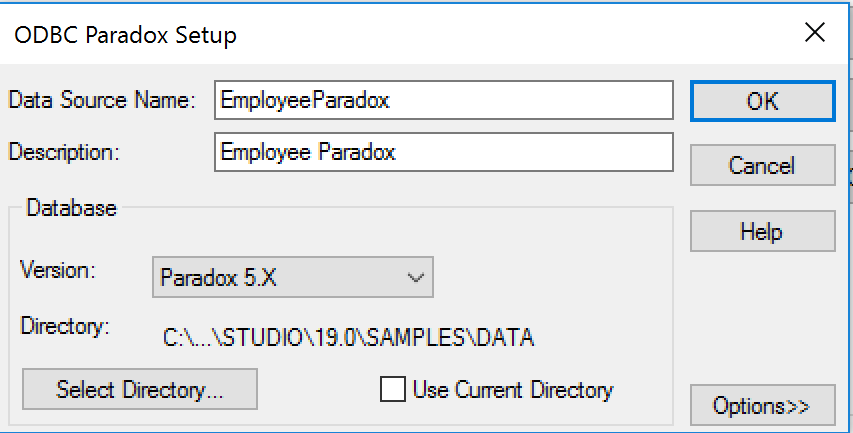
2. Create the ODBC connection for employee.db paradox database:
3. Using RAD Studio, Delphi or C++ Builder 10.2 Tokyo, create a New Multi-Device Application (Blank Application).
4. Drop TFDConnection on the form. Double-click the TFDConnection to open the FireDAC Connection Editor:
5. Select ODBC as the Driver ID. Set the Database property to the folder containing your Paradox files. Here we are using the RAD Studio sample data folder: C:UsersPublicDocumentsEmbarcaderoStudio19.0SamplesData
6. Select the ODBCDriver you are using, and the DataSource you created:
7. On the Multi-Device Form add a FDTable component.
8. Using the Object Inspector, set TableName property of FDTable to your Paradox table:
9. Add a TStringGrid to your Multi-Device form:
10. Right click on the TString Grid and select Bind Visually…
11. Using the LiveBindings Designer, bind the FDTable to the StringGrid:
12. To see Design Time data on the StringGrid, using the Object Inspector for the TFDTable, set the Active proper = True.
Congratulations! This is how you can use FireDAC and the FireDAC ODBC bridge driver and keep your Paradox and/or dBase files with the newer versions of RAD Studio, Delphi and/or C++ Builder!
[DownloadButton Product=’RAD’ Caption=’Try FireDAC and the FireDAC ODBC bridge driver on your own Paradox and/or dBase file today using RAD Studio 10.2 Tokyo’]



Reduce development time and get to market faster with RAD Studio, Delphi, or C++Builder.
Design. Code. Compile. Deploy.
Free Delphi Community Edition Free C++Builder Community Edition


It seems that the ODBC driver is not available in the Professional and CE editions? Not sure why, Paradox is certainly a local database and should be within the license restrictions.
NOT HELPFUL FOR OPENING PARADOX IN 32 BIT PLATFORM VCL PROJECT ON DELPHI 11 ENTERPRISE
It seemed to be pretty helpful.
You can read more by searching through the help like so:
TSTRINGGRID NOT AVAILABLE FOR 32 BIT VCL APPLICATION IN DELPHI 11.2 ENT.
MUST BE ONLY IN FMX
I NEED A DEMO PARADOX PROJECT TO OPEN IN 32 BIT VCL APPLICATION IN DELPHI 11.2 ON WIN 10 (64 BIT) HOME EDITION
PREFERRABLY A DBGRID PROJECT USING DBNAVIGATOR
Ok, a couple of things:
1. TStringGrid definitely exists in the VCL.
2. You can find demos and examples at as a link at the bottom of most help pages. Or you can find them by selecting the RAD Studio Help menu. and then selecting Examples and Samples. They are listed in there in several ways.
3. Typing comments in all uppercase is generally to be avoided since the common interpretation of that is it is that you are shouting, 🙂