



Embarcadero is proud to announce Kai, a new agentic AI platform for Delphi, C++Builder, and RAD Studio.
Kai transforms RAD Studio into an intelligent development environment, combining best-in-class code suggestions with an integrated AI agent that can generate code and UIs, compile projects, resolve errors, and automate workflows both inside and outside the IDE through MCP-powered integrations.
More than a traditional coding assistant, Kai can also serve as a development collaborator, helping teams accelerate new applications, modernize legacy codebases, refactor existing projects, and tackle complex development tasks more efficiently.
Built on a flexible BYOK (Bring Your Own Key) model, Kai supports leading AI providers including GitHub Copilot, OpenAI, Claude, Gemini, and local models, giving developers control over performance, cost, and data privacy.
Table of Contents
Why Use Kai?
Stay in flow
Work entirely within RAD Studio—turn prompts into working code, builds, and fixes without disrupting your momentum.
Smarter coding, built in
Boost productivity with AI-powered inline autocomplete and rich code suggestions that feel like a natural extension of your editor.
Generate UIs, working prototypes and apps
Describe your idea and let Kai instantly create ready-to-use platform-native interfaces, interactive prototypes, and functioning applications.
Modernize your code
If you have an existing application, Kai can help you modernize the code and UI and help refactoring existing codebases, leveraging new language and framework features.
Model flexibility without lock-in
Use the best model for every task—Claude, GPT-5, Gemini, and more—for the perfect balance of speed, cost, and capability.
Enterprise-ready by design
No proxy layer via Embarcadero servers. No mandatory cloud dependency . Your code stays under your control, with local storage and direct model communication.
Local Models for Maximum Protection
When privacy matters most, run Kai fully offline with local LLMs for maximum IP protection and compliance.
An Agentic Workflows, powered by MCP
Orchestrate agentic workflows that handle files, resolve build errors, and manage version control—enabling intelligent, self-directed development inside the IDE. Kai includes an MCP server interface where you can integrate other MCP tools.
Perform File System Operations
The MCP server understands the file system, allowing developers to read, write, and manage project files without extra configuration.
Automated Compile–Fix Workflow
Kai provides an MCP interface for RAD Studio in the IDE, enabling the AI engine to compile an application, read error messages, attempt fixes, and recompile automatically.
Version Control Integration
Use your own MCP server’s version control capabilities to create and manage pull requests directly from the IDE.
Kai UI Features List
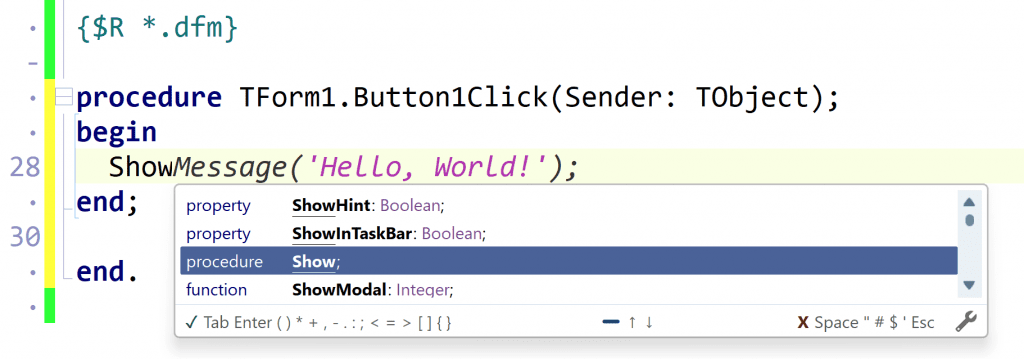
Ghost Text
Automatic, context-aware suggestions appear directly in the editor as faint, translucent text—providing the fastest way to complete your code:
- Automatic appearance after a short pause
- Press Tab to accept, Esc to dismiss
- Non-intrusive inline display
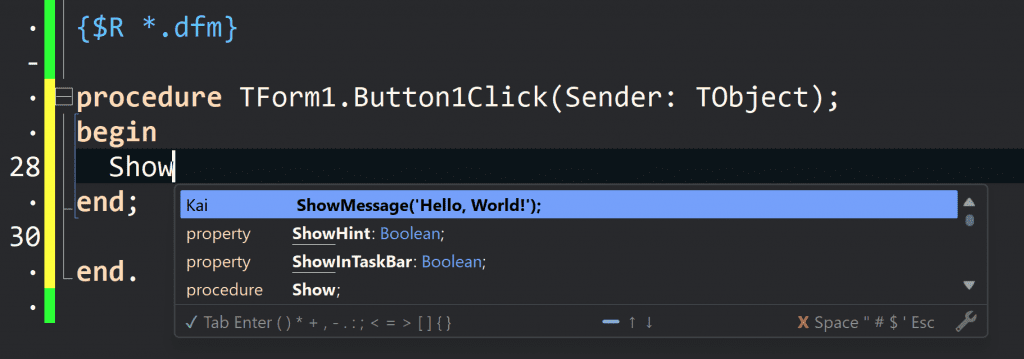
CodeInsight Completions
Typing suggestions integrated into the RAD Studio CodeInsight completion window:
- Appears as the top item in the completion list
- Press Ctrl+Space to open, Enter to accept
- Familiar RAD Studio UI
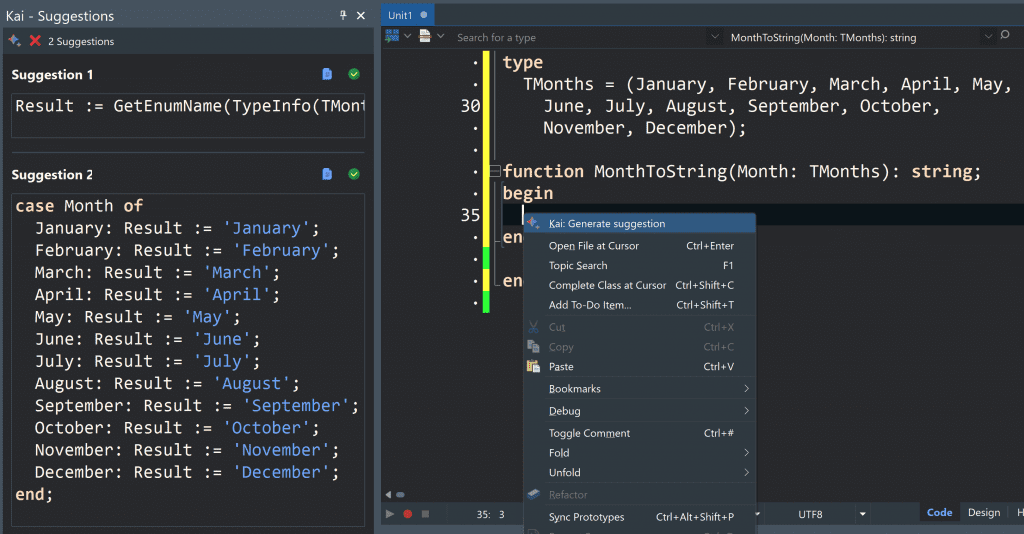
Suggestions
Dedicated panel view for generating and comparing multiple suggestions.
- See multiple alternatives at once
- Manual refresh button to generate suggestions
- Copy or insert buttons for each option
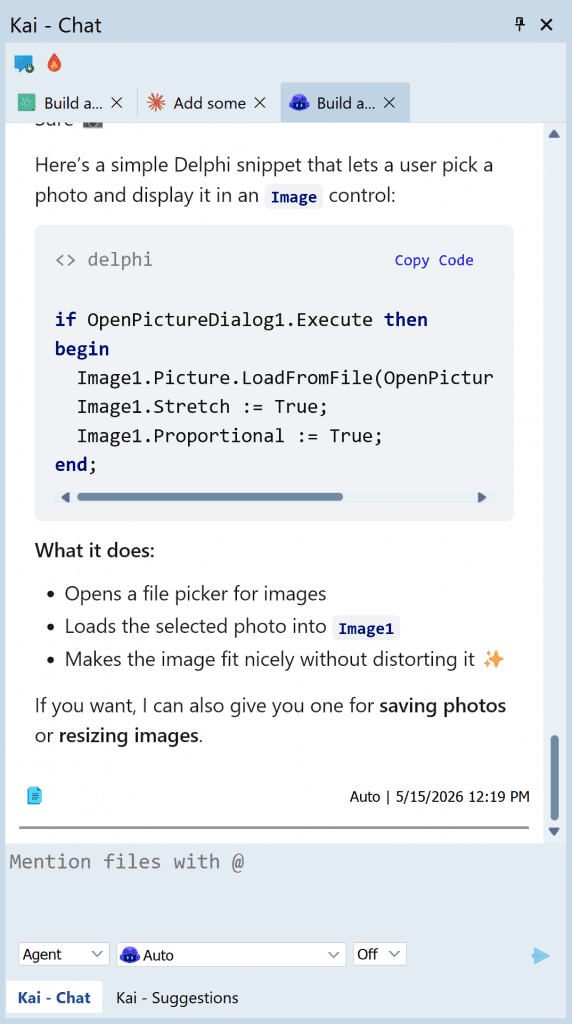
Kai Chat
The Kai Agent is a fully integrated IDE assistant for coding tasks, questions, and project analysis:
- Open via View -> Tool Windows -> Kai Agent
- Chat with AI to compile, debug, implement features
- Reference project files with @ symbol
- Choose from multiple AI models per chat
- Works with cloud or local models
An Truly Agentic Chat
Kai chat is truly an agentic chat, offering workflows powered by MCP. It can orchestrate agentic workflows that handle files, resolve build errors, and manage version control—enabling intelligent, self-directed development inside the IDE. Kai includes an MCP server interface to integrate other MCP tools.
The kai chat can perform file system operations, allowing developers to read, write, and manage project files, but it can work also on edit buffers (unsaved files in the editor)
Kai provides an MCP interface for the IDE, enabling the AI engine to compile an application, read error messages, attempt fixes, and recompile automatically.
See Kai in Action
To see Kai in action you can watch this introductory video.
The announcement webinar is underway, and the recording will be available soon.
Ready to Go
The Kai installation is available in GetIt (the preferred distribution) and will soon be also in the Embarcadero customers portal at https://my.embarcadero.com.
If you are a customer on a recent version of RAD Studio (12 or 13), we are happy to offer you a 30-days free Kai trial key. See the information at
Kai is available with a yearly subscription license, in addition to a new or existing upgrade Subscription to RAD Studio, C++Builder or Delphi. If you are an existing customer, ask your sales rep or reseller partner for a quote.
For more information, you can check the following links:
- The Embarcadero Web Site page for Kai at https://www.embarcadero.com/products/rad-studio/kai
- The Kai page in DocWiki at https://docwiki.embarcadero.com/RADStudio/Florence/en/Kai
We are really excited about Kai and what it brings to the Delphi, C++Builder and RAD Studio development experience. We hope you’ll enjoy using this tool along with your preferred AI engine.
The RAD Studio PMs team

Reduce development time and get to market faster with RAD Studio, Delphi, or C++Builder.
Design. Code. Compile. Deploy.
Free Delphi Community Edition Free C++Builder Community Edition



Is it $250 once or yearly on top of an active Delphi license additionally to the separate cloud llm subscription costs? Considering this it might be better to use Harness of said cloud llm provider instead, build apps with MSBuild and only open Rad Studio to initialize a project.