The version of RAD Server that ships with RAD Studio 10.3 offers a very significant set of enhancements, mostly focused on how a resource (and have a URL) is mapped to classes and methods on the server. While the key idea of having classes (or data modules) that implement resources remains the same, there are two new approaches:
- First, you can now map the same URL and HTTP Verb to multiple method handlers, based on content type and accept types HTTP headers. As a side change, you can also freely map HTTP verbs to custom methods names.
- Second, rather then implementing the actual methods for the HTTP verbs in the resource class, they can be forwarded to a separate and possibly shared implementation class, which needs to support a specific interface. To further simplify things, RAD Studio includes ready to use components for files and datasets management
In this blog post I don’t want to cover all of the options, but just guide you through same example I wrote for my CodeRage 2018 session on RAD Server – the entire source code is also available on GitHub at https://github.com/marcocantu/DelphiSessions/tree/master/RADServer103CodeRage.
Using Multiple Accept Types with EndpointProduce
One of the new features I mentioned above is the ability to have the same exact URL mapped to different methods depending on some HTTP headers. For a GET operation, you can discriminate on the content type indicated in the Accept HTTP header. You do so by decorating the methods with the EndpointProduce attribute plus a related MIME type.
This is the example of a class accepting either images or general data (for Chrome at least application/xml is in any general call):
|
1 2 3 4 5 6 7 8 9 10 11 12 13 14 |
type [ResourceName('content')] TContentResource1 = class(TDataModule) published [ResourceSuffix ('*')] [EndpointProduce ('image/jpeg')] procedure GetImage(const AContext: TEndpointContext; const ARequest: TEndpointRequest; const AResponse: TEndpointResponse); [ResourceSuffix ('*')] [EndpointProduce ('application/xml')] procedure GetText(const AContext: TEndpointContext; const ARequest: TEndpointRequest; const AResponse: TEndpointResponse); end; |
The implementation of these methods is rather trivial, as all the code does is return a file:
|
1 2 3 4 5 6 7 8 |
procedure TContentResource1.GetImage(const AContext: TEndpointContext; const ARequest: TEndpointRequest; const AResponse: TEndpointResponse); var fs: TFileStream; begin fs := TFileStream.Create('c:tempcontent.jpeg', fmOpenRead); AResponse.building.SetStream(fs, 'image/jpeg', True); end; |
How can you test it? Certainly not just pointing your browser to the URL – if you do you invariably receive the result of the second method, but you might also get an error message indicating that none of the available endpoints matches the request. For a simple test, I wrote the following HTML code, which refers to the same URL in two different ways the browser resolves with different Accept headers in the request:
|
1 2 3 4 5 6 7 8 9 10 11 12 13 14 |
<html> <head> <title>a page for rad server</title> </head> <building> <h1>a page</h1> <p>an image below</p> <img src="https://community.idera.com/content/test.jpeg"> <h1>some more</h1> <iframe src="https://community.idera.com/content/test.txt"> </building> </html> |
Notice you can also serve this from RAD Server by setting it in the — section of the INI file (refer to doc or this blog post).
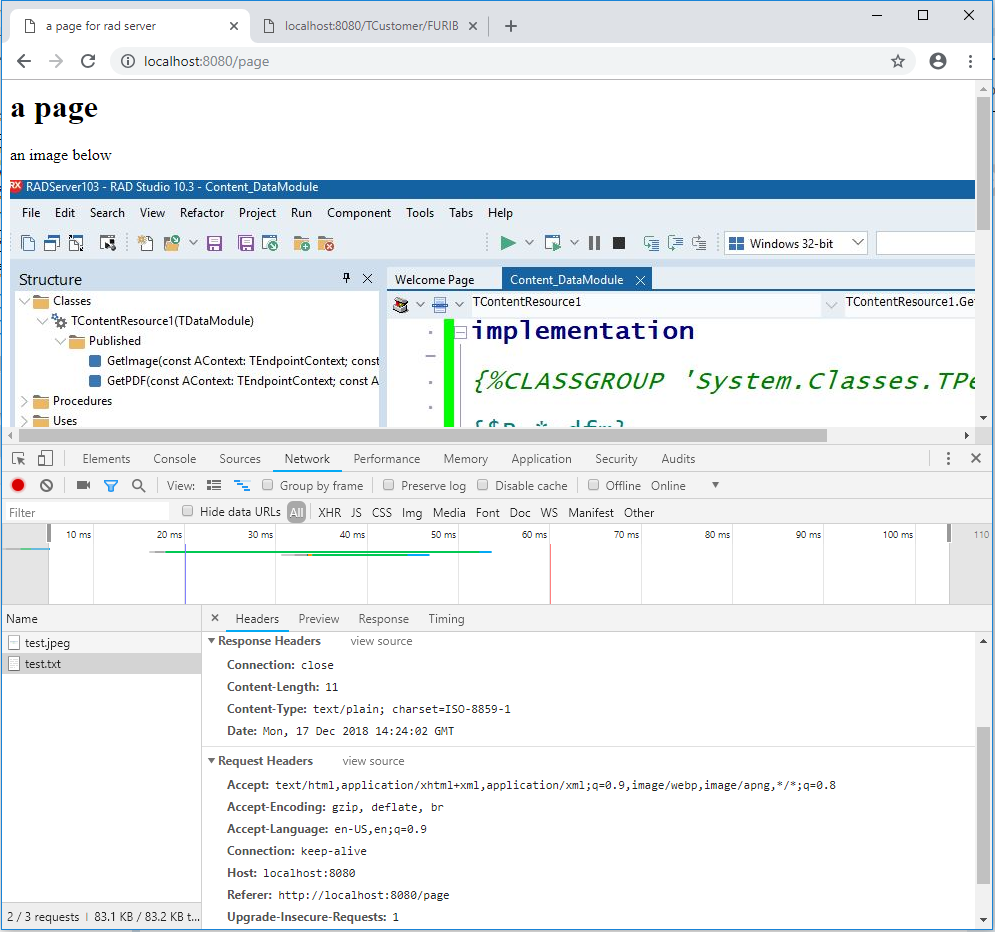
Now the output of the page looks like the following, with the two request being handled by different methods:

You can see what goes on by enabling, for example, the Dev Tools support in Chrome and looking to the headers of the second request (the test.txt source in the frame):
Using the EMSFileResource Component
The new ability to delegate the resource implementation is best demonstrated by using the new components introduced in 10.3. Using the TEMSFileResource component is an easier way to return files compared the implementation above, and actually allowing both reading and updating the files with literally no code.
Adding the component to a data module (or creating it in code) is fairly direct, as the only properties you need are the allowed actions (which HTML methods you can execute) and the folder. Notice that more than a folder you need a template mapped to the URL, so any additional URL param is interpreted as the file name.
|
1 2 3 4 |
object EMSFileResource1: TEMSFileResource AllowedActions = [List, Get] PathTemplate = 'c:temp{id}' end |
In term of data module class declaration, all you need is map the operations (list and get, in this case) to the component):
|
1 2 3 4 5 6 7 8 |
type [ResourceName('files')] TFilesResource1 = class(TDataModule) [ResourceSuffix('list', '/')] [ResourceSuffix('get', '/{id}')] EMSFileResource1: TEMSFileResource; published end; |
This is all you need to be able to return a JSON array with the list of the files and access any of those files. This is the list of files in JSON format in a browser:

Using the EMSDataSetResource Component
If accessing files is nice and can be handy in a few applications, the other new component for RAD Server applications added in 10.3, EMSDataSetResource, is the one that can really save a lot of work for a lot of web services — given most of the services end up accessing databases. The simplest way to see this component in action is to drop on a data module a database connection (in this case with a SQL Lite connection to a sample database we ship with RAD Studio), a simple query, and a EMSDataSetResource component connected with the query.
Again, the components needs to have proper settings in AllowedActions. Also the components have several options for features you want to enabled, like paging and sorting, and ways to manually indicate the keyfield and how to match a single record request. For paging, I set a smaller page size for the demo, as this makes it easier to see in action:
|
1 2 3 4 5 6 7 8 9 10 11 12 13 14 15 16 17 18 19 |
object TCustomerResource1: TTCustomerResource1 object EmployeeConnection: TFDConnection Params.Strings = ( 'ConnectionDef=SQLite_Demo') Connected = True LoginPrompt = False end object CustomerTable: TFDQuery Connection = EmployeeConnection SQL.Strings = ( 'SELECT * FROM CUSTOMERS' 'ORDER BY {IIF(!SORT, !SORT, CustomerID)}') end object CustomerResource: TEMSDataSetResource AllowedActions = [List, Get, Post, Put, Delete] DataSet = CustomerTable PageSize = 10 end end |
Now the implementation of this RAD Server resource, which allows reading pages of data, read individual record, update and create new records, has no actual code (deleting doesn’t really work because there are other tables with foreign keys to the table in question):
|
1 2 3 4 5 6 7 8 9 10 11 12 13 |
type [ResourceName('TCustomer')] TTCustomerResource1 = class(TDataModule) EmployeeConnection: TFDConnection; CustomerTable: TFDQuery; [ResourceSuffix('list', '/')] [ResourceSuffix('get', '/{CustomerID}')] [ResourceSuffix('put', '/{CustomerID}')] [ResourceSuffix('post', '/')] [ResourceSuffix('delete', '/{CustomerID}')] CustomerResource: TEMSDataSetResource; FDQuery1: TFDQuery; end; |
Here are two browser images with a page of data and an individual record:
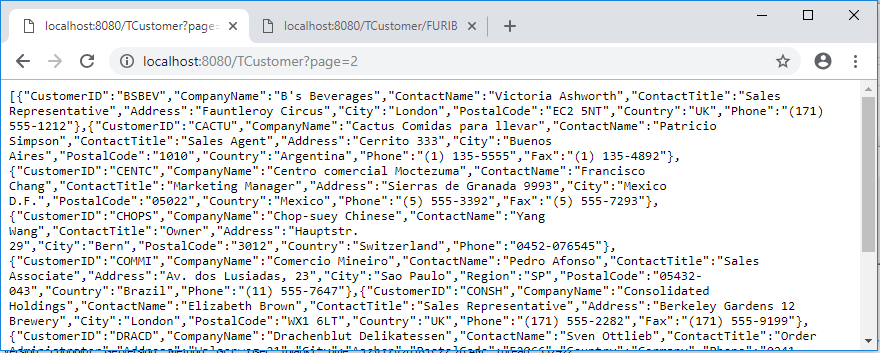
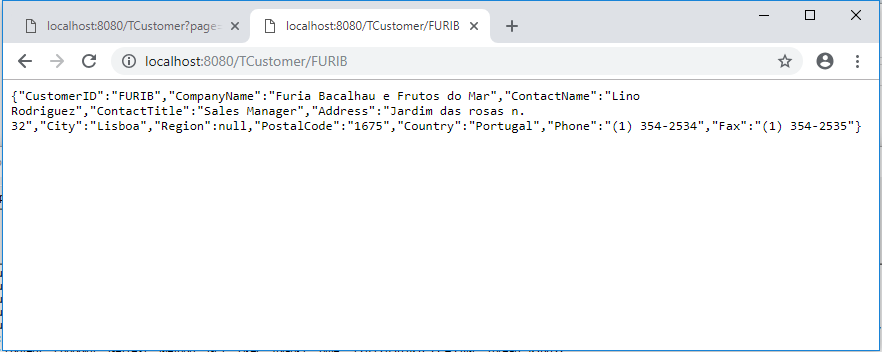
The EMSDataSetResource component has many more functionalities than this blog post and the demo (again, avaialble on GitHub) shows, but this should provide you with a good starting point to explore what’s new for RAD Server development in RAD Studio 10.3.



Reduce development time and get to market faster with RAD Studio, Delphi, or C++Builder.
Design. Code. Compile. Deploy.
Free Delphi Community Edition Free C++Builder Community Edition