Embarcadero is pleased to announce the release of RAD Studio 13.2 along with Delphi 13.2 Florence and C++Builder 13.2 Florence. This release has a strong focus on compiler technology and performance, Linux and Windows on Arm, developer productivity, modern UI development, C++Builder, AI integration, and quality across the product.
There is quite a lot in this release. Rather than trying to cover every single change here, we want to highlight the key enhancements in this release, along with the main areas of quality improvement, touching on what developers will notice most.
Table of Contents
A New Delphi LLVM 20 Compiler for Linux
One of the biggest changes in 13.2 is the new Delphi LLVM 20 compiler and toolchain for Linux Intel 64-bit.
The entire Linux64 toolchain has moved to LLVM 20, including a modern linker and much richer debug information. The compiler is available both as a 32-bit and a 64-bit binary, so it’s available in both the 32-bit IDE and 64-bit IDE. In other words, in the 64-bit IDE you can now target Linux64 along with Windows 64 and Windows an Arm. However, you can also keep using the 32-bit IDE, if your Linux projects are small.
This release is particularly relevant if you’re using Delphi for Linux services, middleware, database applications, or other server-side development. And, of course, FMXLinux applications benefit from the new compiler as well.
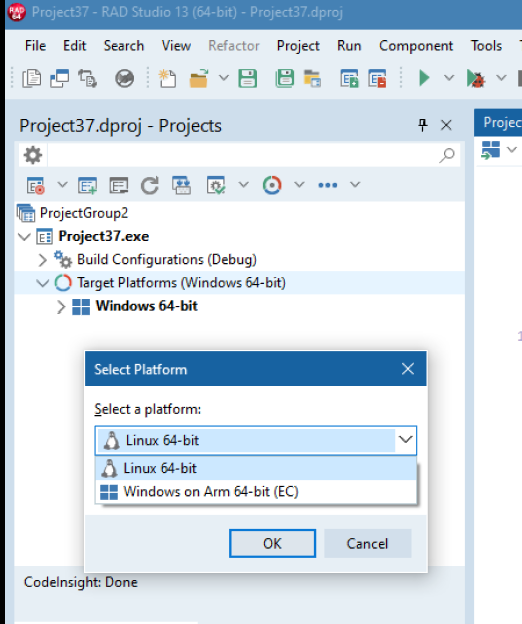
(Adding the Linux target in the 64-bit IDE)
C++Builder Win64x Keeps Moving Forward
There’s significant work for C++Builder developers as well.
The modern Win64x C++ compiler now runs directly inside the IDE as an in-process compiler. This gives the IDE accurate file and line progress, structured diagnostics that navigate back to the source, responsive build cancellation, and parallel compilation while keeping the entire build process integrated.
We’ve also continued improving package-based C++ development, including design-time packages, packages containing Delphi units, dependencies, resources, and package consumption across projects.
There are also fewer unnecessary rebuilds, plus an optional Delphi memory manager for applications with particularly demanding allocation patterns.
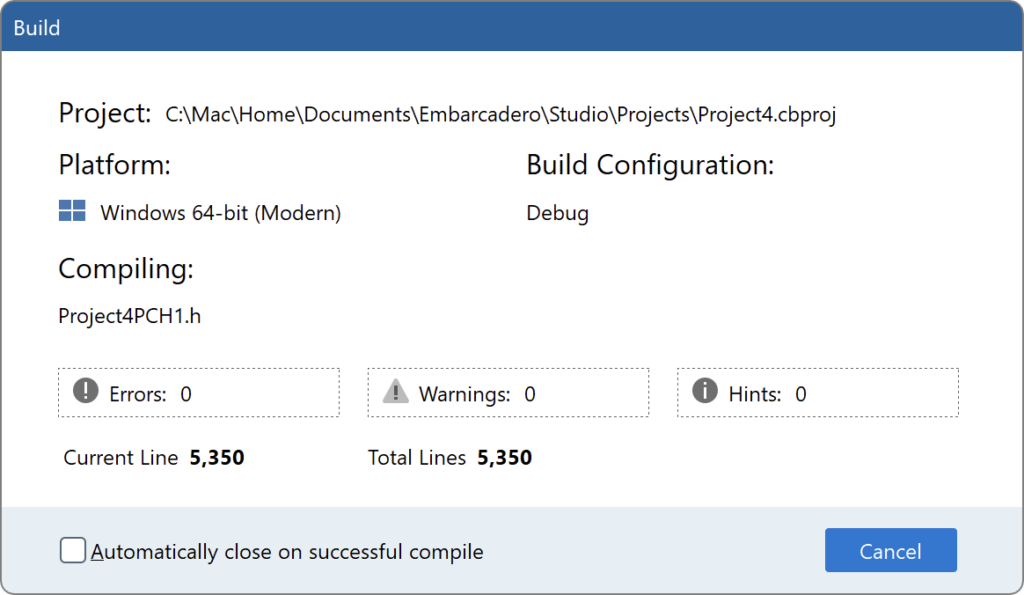
In-process compilation of C++ in the 64-bit IDE
Much Faster Compilation — and Faster Applications
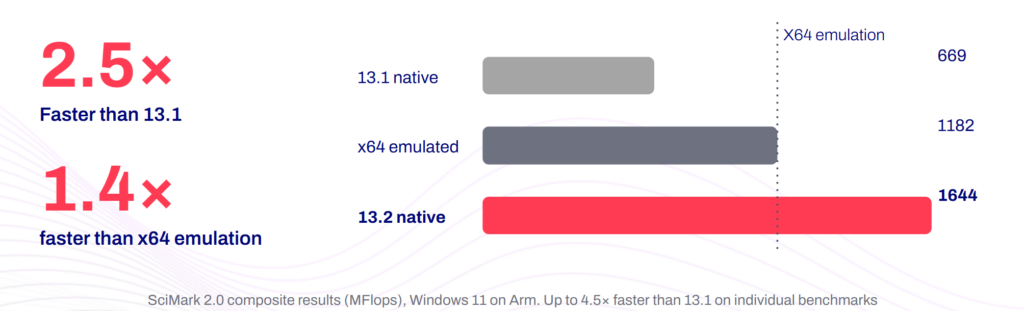
We’ve done significant work on the performance of the LLVM-based Delphi compilers for both Linux Intel 64-bit and Windows Arm64EC.
The compilers now support parallel code generation, taking advantage of multiple CPU cores during compilation. This makes a particularly large difference with big projects and Release builds. In our internal testing, we’ve seen some representative FireMonkey builds compile up to 14 times faster.
We’ve also enabled a new generation of compiler optimizations. Depending on the code, we’ve measured Release applications running two to four times faster, with some tests reaching as much as seven times faster.
Windows Arm64EC also gets a new default memory manager based on FastMM4, along with the option of using the high-performance rpmalloc memory manager for allocation-heavy or highly multithreaded applications.
In other words, 13.2 isn’t just about supporting newer platforms. We’ve spent a lot of effort making Delphi substantially faster on them.
Navigator Is Now Part of RAD Studio
After integrating Bookmarks in RAD Studio 13.1, in 13.2 we’ve taken the next step and integrated Navigator directly into the IDE.
Navigator’s Goto dialog gives you very fast, real-time access to units, types, methods, and other symbols. It’s especially useful when you’re working with a large codebase and know roughly what you’re looking for but don’t want to spend your time hunting through files.
The editor minimap has also been enhanced to show the structure of the current source file, active line, breakpoints, and error annotations.
It’s one of those features that’s fairly simple to explain, but can make a surprisingly big difference when you spend your day navigating a large application.
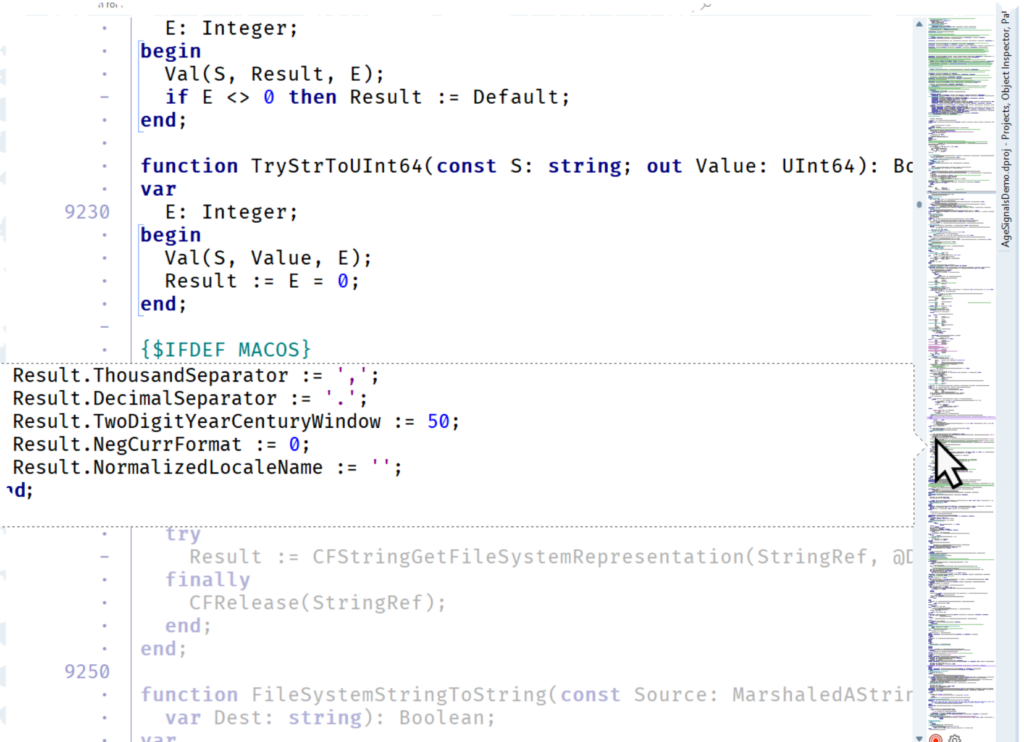
The Minimap in the Navigator plugin, now integrated in the IDE
New VCL Navigation Controls
For Windows developers, 13.2 adds two new VCL controls: TTabView and TNavigationView.
TTabView provides a modern tabbed UI with images, multiline captions, close and add buttons, scrolling, and a menu for accessing open tabs. Tabs can contain forms or other controls, so it works well for document-style applications, dashboards, development tools, and other multi-view interfaces.
TNavigationView provides a modern vertical navigation UI, with normal and compact modes, images, multiline text, scrolling, drag-and-drop reordering, and extensive customization.
Both controls are designed to make it easier to create more contemporary Windows interfaces while remaining fully within the VCL programming model.
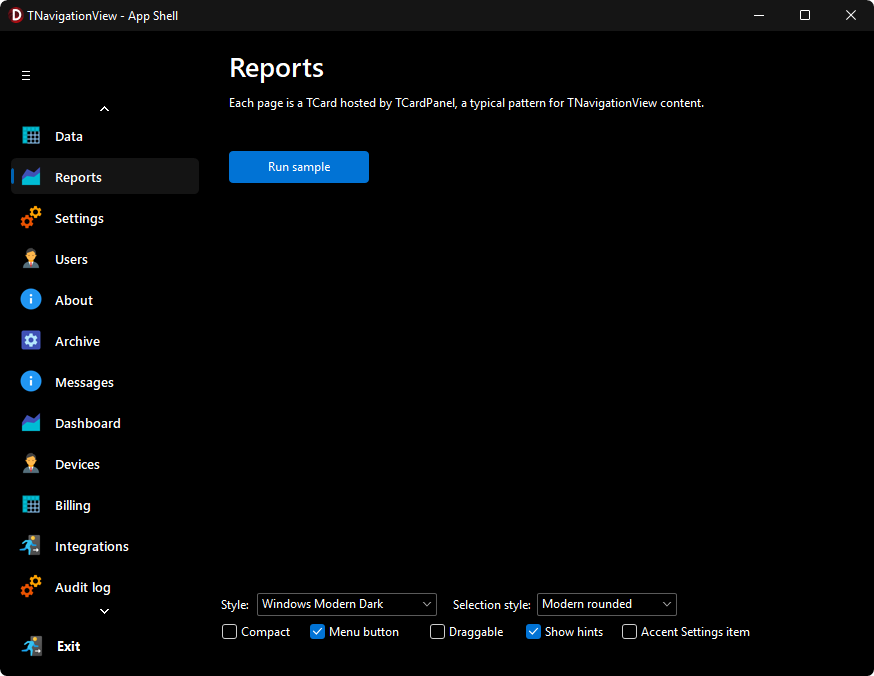
The TNavigationView control in dark mode
More Power for the FireMonkey Style Designer
The FireMonkey Style Designer, which we introduced in 13.1, gets a substantial update in 13.2.
You can now launch it directly from the IDE and use existing VCL Style Format files from the Bitmap Style Designer as a starting point. We’ve also added search and analysis tools that can identify unused resources, broken references, duplicate names, and other potential problems.
On the design side, there are new gradient resources, Circle and Ellipse vector elements, rasterization, glow effects, support for multiple effects on an element, and more complete text-layout options.
The goal is to make creating and maintaining sophisticated FireMonkey styles considerably easier — particularly when styles become large and complex. The FireMonkey Style Designer is a tool you can give to a graphic designer, not a developer, and its UX matches the experience with popular design tools.
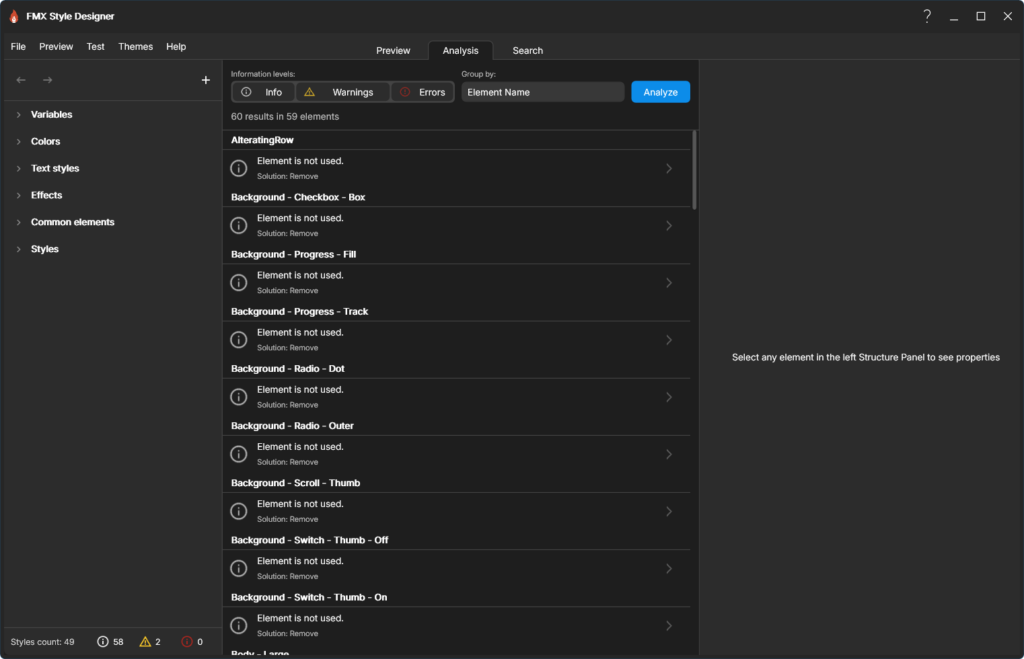
Analyzing a style in the FireMonkey Style Designer
Runtime Packages on Windows on Arm
Another important piece of our Windows on Arm work lands in 13.2: Delphi runtime packages for Windows Arm64EC.
You can now create and consume dynamic runtime packages on Windows on Arm. That means applications that use Delphi’s package architecture can move to Arm without having to abandon that architecture or redesign how their applications are modularized.
For developers with large existing Delphi applications, this removes another significant barrier to targeting Windows on Arm.
AI Components and MCP Development
We’ve also done a significant amount of work on the AI components available to RAD Studio developers.
The SmartCore AI Components Pack has been extensively refactored and is available through GetIt for both Delphi and C++Builder. It provides broader access to APIs and capabilities from OpenAI, Anthropic Claude, Google Gemini, and Ollama, while maintaining a provider-independent architecture. This feature will become available in Getit in the coming days.
This gives you building blocks for conversational applications, content and image generation, structured responses, data analysis, application-specific assistants, and other AI-powered features without having to implement each provider API yourself.
RAD Studio 13.2 also includes MCPConnect as an additional GetIt download for Delphi and C++Builder.
MCPConnect makes it much easier to build Model Context Protocol (MCP) servers and expose your existing application functionality, business logic, data, and prompts to AI clients and agents. It takes care of much of the protocol plumbing — routing, serialization, schema generation, sessions, HTTP and standard I/O communication — leaving you to concentrate on what your application actually provides.

The MCPConnect GetIt package icon
And a Lot of Quality Work
A release like 13.2 isn’t only about the headline features. We’ve also continued working through a large number of smaller — but often very noticeable — issues across the IDE, debugger, compilers, frameworks, databases, and platforms.
The IDE has improvements around brace and parenthesis matching, Linux-style line endings, High DPI form inheritance, C++ syntax highlighting, module reloading, the Object Inspector, IDE Insight, and more.
The LLDB-based debuggers have better support for inspecting modern C++ data structures as well as Delphi Variants, arrays, and properties, together with faster symbol processing and reduced debugger overhead.
We’ve also made many fixes specifically to the new LLVM platforms, including Linux shared libraries and DataSnap deployment, and Windows Arm64EC linking, debugging, exceptions, floating point, generics, imported functions, resources, and static-library interoperability.
FireMonkey, Skia, Android, Databases and Web
There are updates across the frameworks and platforms too.
Skia4Delphi moves to version 7.3, with fixes, broader Linux compatibility, Windows 7 runtime support, and rendering performance improvements. We’ve also reworked FireMonkey animation responsiveness on Windows and improved the style-viewer tools for Per-Monitor v2 High DPI.
On Android, the default minimum SDK is now API level 24, with corresponding installer and NDK updates. We’ve refreshed the Google AdMob and Google Maps libraries and added low-level access to the Android Age Verification APIs and related application entitlement. The Age Verification APIs are available also for iOS.
FireDAC adds support for PostgreSQL 18.4, configurable Oracle CLOB prefetching, and IBM Informix connectivity from Linux through the Informix ODBC driver.
For web and Internet development, we’ve added OAuth 2 Authorization Code Flow with PKCE, along with improvements to socket timeout handling, HTTP certificate information, REST Debugger URL validation, and web file dispatching.
WebStencils now provides explicit access to dataset field information, while the RAD Server Management Console gains sortable user and group columns and improved High DPI support.
RAD Studio 13.2 Florence in Summary
There’s much more in RAD Studio 13.2 than we can reasonably cover in a single announcement post, but I think the overall direction of this release is clear.
We’ve invested heavily in the next generation of Delphi compilers, particularly Linux and Windows on Arm, while also making those compilers much faster. At the same time, we’ve continued improving the everyday IDE experience, modern Windows UI development, FireMonkey styling, C++Builder, database and web development, and the tools developers need to connect their applications to the rapidly evolving AI ecosystem.
RAD Studio 13.2 Florence is Available Today
You can find more information:
- on the Embarcadero web site what’s new page (www.embarcadero.com/products/rad-studio/whats-new-in-13-florence)
- on the docWiki page covering 13.2 (https://docwiki.embarcadero.com/RADStudio/Florence/en/13_Florence_-_Release_2)
- in past blog posts highlighting some of the features discussed here.
- in the docwiki list of publicly reported issues fixed in this release (https://docwiki.embarcadero.com/RADStudio/Florence/en/New_features_and_customer_reported_issues_fixed_in_RAD_Studio_13.2).
We’ll sync up the Quality Portal entries over the next few days.
We’re confident you’ll find this release valuable in your day-to-day development with RAD Studio, C++Builder, and Delphi.
Elevate your development experience with RAD Studio 13 Florence Update 2.


Reduce development time and get to market faster with RAD Studio, Delphi, or C++Builder.
Design. Code. Compile. Deploy.
Free Delphi Community Edition Free C++Builder Community Edition