



Based on this wiki : a convolutional neural network (CNN, or ConvNet) is a class of deep neural network, most commonly applied to analyze visual imagery. They are also known as shift invariant or space invariant artificial neural networks (SIANN).
Convolutional Neural Network? That sounds complicated! Is it?
Good news, DeepAI.org has provided an API to access, so we can quickly build applications using it. Follow along as we show you how..
How do I set up an app with DeepAI API?
- Signup and Login to https://deepai.org
- Then you will automatically get the API Key.
- Now create a new Multi Device Application in your RAD Studio Delphi IDE
- Read the API Doc here https://deepai.org/machine-learning-model/toonify
We can emulate what curl does for access to DeepAI API, because it looks quite straight-forward.
curl
    -F 'image=@/path/to/your/file.jpg'
    -H 'api-key:1ade887c-a8e2-4b91-b888-947aa67cde17'
    https://api.deepai.org/api/toonify
here what that looks like in Delphi code:
procedure Toonify;
var
  LRestClient: TRESTClient;
  LRestRequest: TRESTRequest;
  LImageDownload: TDownloadURL;
  LResponse: TJSONObject;
begin
  LRestClient := TRESTClient.Create(TOONIFY_API_URL);
  LRestRequest:= TRESTRequest.Create(nil);
  try
    LRestRequest.Method := rmPOST;
    LRestRequest.AddParameter('api-key', edtApiKey.Text, TRESTRequestParameterKind.pkHTTPHEADER, [poDoNotEncode]);
    LRestRequest.AddFile('image', OriginalFilename);
    LRestRequest.Client := LRestClient;
    LRestRequest.Execute;
    LResponse := LRestRequest.Response.JSONValue as TJSONObject;
    // LReponse image url processing here ..
  finally
    LRestRequest.Free;
    LRestClient.Free;
  end;
end;
Using the API’s JSON output
The above code is only accessing JSON result from Toonify API, which JSON result similar to the following:
{
    "id": "fcf837eb-640f-4f02-97e29ab02377",
    "output_url": "https://api.deepai.org/job-view-file/fcf837eb-ab02377/outputs/output.jpg"}
Converting the API output into something useful
So, to download the image and then attach it to the component Timage as a result of the process, here is the code:
var
  ..
  LMemStream: TMemoryStream;
  LBitmapItem: TFixedBitmapItem;
  ..
begin
  ..
  LImageDownload := TDownloadURL.Create;
  LMemStream := TMemoryStream.Create();
  try
   LImageDownload.DownloadRawBytes(LResponse.GetValue('output_url').Value, LMemStream);
   LBitmapItem := Image2.MultiResBitmap.Add;
   LBitmapItem.Bitmap.LoadFromStream(LMemStream);
  except on E: Exception do
   ShowMessage('Error: '+E.Message);
  end;
  LImageDownload.Free;
  LMemStream.Free;
  ..
end
Full Delphi source code to cartoonify and image using the DeepAI API
The full Tonify method is this:
procedure TForm2.Toonify;
var
  LRestClient: TRESTClient;
  LRestRequest: TRESTRequest;
  LImageDownload: TDownloadURL;
  LResponse: TJSONObject;
  LMemStream: TMemoryStream;
  LBitmapItem: TFixedBitmapItem;
begin
  LRestClient := TRESTClient.Create(TOONIFY_API_URL);
  LRestRequest:= TRESTRequest.Create(nil);
  try
    LRestRequest.Method := rmPOST;
    LRestRequest.AddParameter('api-key', edtApiKey.Text, TRESTRequestParameterKind.pkHTTPHEADER, [poDoNotEncode]);
    LRestRequest.AddFile('image', OriginalFilename);
    LRestRequest.Client := LRestClient;
    LRestRequest.Execute;
    LResponse := LRestRequest.Response.JSONValue as TJSONObject;
    LImageDownload := TDownloadURL.Create;
    LMemStream := TMemoryStream.Create();
    try
      LImageDownload.DownloadRawBytes(LResponse.GetValue('output_url').Value, LMemStream);
      LBitmapItem := Image2.MultiResBitmap.Add;
      LBitmapItem.Bitmap.LoadFromStream(LMemStream);
    except on E: Exception do
    end;
    LImageDownload.Free;
    LMemStream.Free;
  finally
    LRestRequest.Free;
    LRestClient.Free;
  end;

end;
What does the application look like?

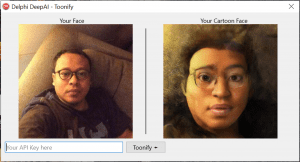
Check out the full source code here (GitHub link) https://github.com/herux/DelphiDeepAI-Toonify.git
Now you know how to use a Neural Network to cartoonify images in your Windows and mobile apps using Delphi! How would you use it?