この記事は、David Intersimoneのブログの抄訳です
このブログでは、C++Builderバージョン11 Alexandriaで利用可能なC++コンバイラについて紹介いたします。
下記の情報は、Windowsのコマンドプロンプトを起動し、「bccXXXX —version」 という入力して、各ターゲットプラットホーム向けのC++コンパイラのバージョンを出力した例です。
bcc32.exe --version

C:¥Program Files (x86)¥Embarcadero¥Studio¥22.0¥bin>bcc32.exe --version
Embarcadero C++ 7.60 for Win32 Copyright (c) 1993-2021 Embarcadero Technologies, Inc.
Revision 7.60.7880.37811

bcc32c.exe  --version

C:¥Program Files (x86)¥Embarcadero¥Studio¥22.0¥bin>bcc32c.exe  --version
Embarcadero C++ 7.60 for Win32 Copyright (c) 2012-2021 Embarcadero Technologies, Inc.
Embarcadero Technologies Inc. bcc32c version 5.0.2 (69de348c.c83071db.37689) (based on LLVM 5.0.2)
Target: i686-pc-windows-omf
Thread model: posix
InstalledDir: C:¥Program Files (x86)¥Embarcadero¥Studio¥22.0¥bin

bcc32x.exe  --version

C:¥Program Files (x86)¥Embarcadero¥Studio¥22.0¥bin>bcc32x.exe  --version
Embarcadero C++ 7.60 for Win32 Copyright (c) 2012-2021 Embarcadero Technologies, Inc.
Embarcadero Technologies Inc. bcc32x version 5.0.2 (69de348c.c83071db.37689) (based on LLVM 5.0.2)
Target: i686-pc-windows-omf
Thread model: posix
InstalledDir: C:¥Program Files (x86)¥Embarcadero¥Studio¥22.0¥bin

bcc64.exe  --version

Embarcadero C++ 7.60 for Win64 Copyright (c) 2012-2021 Embarcadero Technologies, Inc.
Embarcadero Technologies Inc. bcc64 version 5.0.2 (69de348c.c83071db.37689) (based on LLVM 5.0.2)
Target: x86_64-pc-windows-elf
Thread model: posix
InstalledDir: C:¥Program Files (x86)¥Embarcadero¥Studio¥22.0¥bin

bccaarm.exe  --version

Embarcadero C++ 7.60 for Android Copyright (c) 2012-2021 Embarcadero Technologies, Inc.
Embarcadero Technologies Inc. bccaarm version 3.3.1 (37761.ab293fa.1a350c1) (based on LLVM 3.3.1)
Target: thumbv7-none-linux-androideabi
Thread model: posix

bcciosarm64.exe  --version

Embarcadero C++ 7.60 for iOS 64-bit device Copyright (c) 2012-2021 Embarcadero Technologies, Inc.
Embarcadero Technologies Inc. bcciosarm64 version 3.3.1 (37761.ab293fa.1a350c1) (based on LLVM 3.3.1)
Target: arm64-apple-ios
Thread model: posix
特定のC++Builderバージョンでテストする必要がある場合は、#ifdefなどのdefineや定義済みマクロなどを使用し、C++のソースコードを条件付きコンパイルすることができます。
簡単なサンプルコードの例は、以下の通りです。
// create a C++ Multi-Device Application. // drop a TButton and TMemo on the form // Here is the header file declaration: //--------------------------------------------------------------------------- #ifndef MainUnitH #define MainUnitH //--------------------------------------------------------------------------- #include#include #include #include #include #include #include #include #include //--------------------------------------------------------------------------- class TForm2 : public TForm { __published: // IDE-managed Components TButton *Button1; TMemo *Memo1; void __fastcall Button1Click(TObject *Sender); private: // User declarations public: // User declarations String PlatformPath; __fastcall TForm2(TComponent* Owner); }; //--------------------------------------------------------------------------- extern PACKAGE TForm2 *Form2; //--------------------------------------------------------------------------- #endif Here is the TButton onClick event handler with code: void __fastcall TForm2::Button1Click(TObject *Sender) { switch (TOSVersion::Platform) { case TOSVersion::TPlatform::pfWindows: PlatformPath = "Windows"; break; case TOSVersion::TPlatform::pfMacOS: PlatformPath = "macOS"; break; case TOSVersion::TPlatform::pfiOS: PlatformPath = "iOS"; break; case TOSVersion::TPlatform::pfAndroid: PlatformPath = "Android"; case TOSVersion::TPlatform::pfWinRT: PlatformPath = "WinRT"; break; case TOSVersion::TPlatform::pfLinux: PlatformPath = "Linux"; break; default: PlatformPath = "Unexpected platform"; } Memo1->Lines->Add("TPlatform: "+PlatformPath); Memo1->Lines->Add(TOSVersion::ToString()); Memo1->Lines->Add("Name: "+TOSVersion::Name); Memo1->Lines->Add("Build: "+IntToStr(TOSVersion::Build)); Memo1->Lines->Add("Major: "+IntToStr(TOSVersion::Major)); Memo1->Lines->Add("Minor: "+IntToStr(TOSVersion::Minor)); Memo1->Lines->Add("Service Pack Major: "+IntToStr(TOSVersion::ServicePackMajor)); Memo1->Lines->Add("Service Pack Minor: "+IntToStr(TOSVersion::ServicePackMinor)); Memo1->Lines->Add( "C++Builder Compiler Version: " + IntToStr(__CODEGEARC__) ); Memo1->Lines->Add( "C++Builder Compiler Version (hex): " + Format("%x",__CODEGEARC__) ); Memo1->Lines->Add( "C++Builder Compiler Version: " + IntToStr(__CODEGEARC_VERSION__) ); #ifdef _Windows Memo1->Lines->Add("Defined: _Windows"); #endif #ifdef WIN32 Memo1->Lines->Add("Defined: WIN32"); #endif #ifdef __WIN32__ Memo1->Lines->Add("Defined: __WIN32__"); #endif #ifdef _WIN64 Memo1->Lines->Add("Defined: _WIN64"); #endif #ifdef __APPLE__ Memo1->Lines->Add("Defined: __APPLE__"); #endif #ifdef IOS Memo1->Lines->Add("Defined: IOS"); #endif #ifdef IOS64 Memo1->Lines->Add("Defined: IOS64"); #endif #ifdef __ANDROID__ Memo1->Lines->Add("Defined: __ANDROID__"); #endif #ifdef ANDROID Memo1->Lines->Add("Defined: ANDROID"); #endif #ifdef ANDROID32 Memo1->Lines->Add("Defined: ANDROID32"); #endif #ifdef ANDROID64 Memo1->Lines->Add("Defined: ANDROID64"); #endif #ifdef MACOS Memo1->Lines->Add("Defined: MACOS"); #endif #ifdef MACOS64 Memo1->Lines->Add("Defined: MACOS64"); #endif #ifdef OSX Memo1->Lines->Add("Defined: OSX"); #endif #ifdef OSX64 Memo1->Lines->Add("Defined: OSX64"); #endif #ifdef LINUX Memo1->Lines->Add("Defined: LINUX"); #endif #ifdef LINUX32 Memo1->Lines->Add("Defined: LINUX32"); #endif #ifdef LINUX64 Memo1->Lines->Add("Defined: LINUX64"); #endif #ifdef POSIX Memo1->Lines->Add("Defined: POSIX"); #endif #ifdef POSIX32 Memo1->Lines->Add("Defined: POSIX32"); #endif #ifdef POSIX64 Memo1->Lines->Add("Defined: POSIX64"); #endif #if defined(__CONSOLE__) Memo1->Lines->Add("Defined: __CONSOLE__"); #endif #if defined(CPUX86) Memo1->Lines->Add("Defined: CPUX86"); #endif #if defined(CPUX64) Memo1->Lines->Add("Defined: CPUX64"); #endif #ifdef CPU32BITS Memo1->Lines->Add("Defined: CPU32BITS"); #endif #ifdef CPU64BITS Memo1->Lines->Add("Defined: CPU64BITS"); #endif #ifdef __arm__ Memo1->Lines->Add("Defined: __arm__"); #endif #ifdef __arm64__ Memo1->Lines->Add("Defined: __arm64__"); #endif #ifdef __cplusplus Memo1->Lines->Add("Defined: __cplusplus"); #endif #ifdef __BORLANDC__ Memo1->Lines->Add("Defined: __BORLANDC__"); #endif #ifdef __BCPLUSPLUS__ Memo1->Lines->Add("Defined: __BCPLUSPLUS__"); #endif #if defined(__clang__) Memo1->Lines->Add( "Clang Version: " + IntToStr(__clang_major__) + "." + IntToStr(__clang_minor__) + "." + IntToStr(__clang_patchlevel__) ); Memo1->Lines->Add( "Clang Marketing Version: " + String(__clang_version__) ); #endif }
下図のClangコンパイラ(bcc32c)を使用したサンプルプログラムの出力情報の例です。
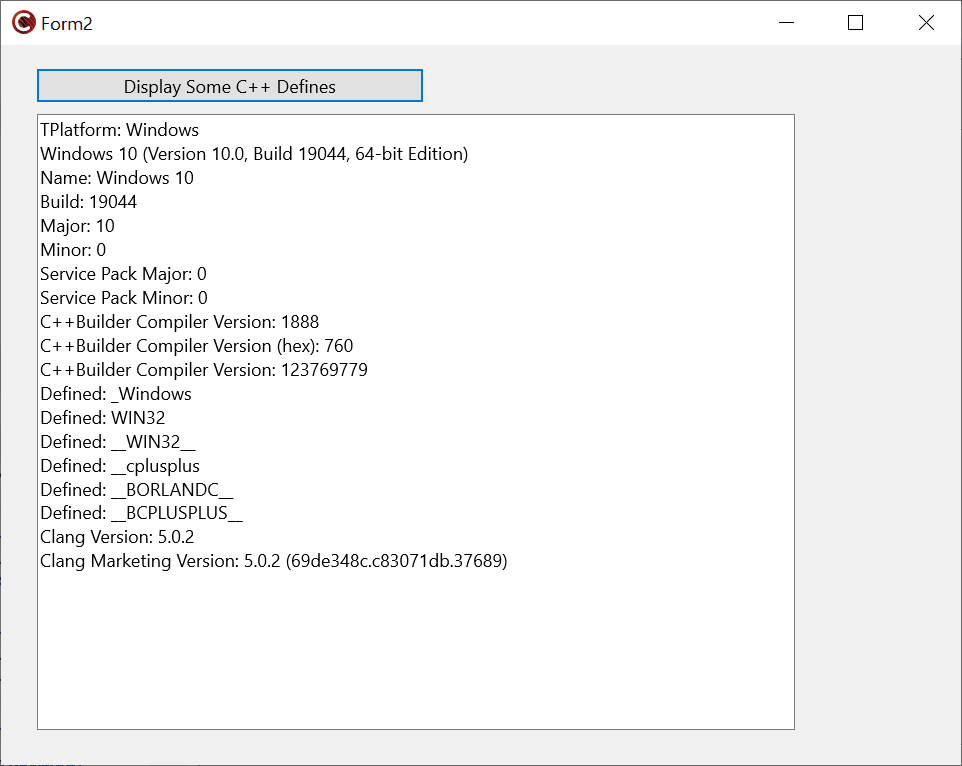
このブログに関連する追加のリンク情報は、以下の通りです。
- https://docwiki.embarcadero.com/RADStudio/Alexandria/ja/定義済みマクロ
- https://docwiki.embarcadero.com/RADStudio/Alexandria/ja/Clang_拡張_C%2B%2B_コンパイラ
- http://clang.llvm.org/docs/LanguageExtensions.html#builtinmacros
- https://docwiki.embarcadero.com/RADStudio/Alexandria/en/Predefined_Macros#C.2B.2B_Compiler_Versions_in_Predefined_Macros
- https://en.cppreference.com/w/cpp/compiler_support
- https://blogs.embarcadero.com/ja/c-builder-support-for-iso-c-in-version-10-4-sydney-ja/


Reduce development time and get to market faster with RAD Studio, Delphi, or C++Builder.
Design. Code. Compile. Deploy.
Free Delphi Community Edition Free C++Builder Community Edition