この記事は、Muminjon 氏のブログの抄訳です
MNIST (Modified National Institute of Standards and Technologyの略)は、包括的なコンピュータビジョンデータベースのるつぼです。1999年のリリース以来、MNISTの古典的な手書きのイメージのデータセットは、分類アルゴリズムのベンチマークの基盤として受け入れられてきました。

ほとんどの場合、はじめて学習する方はMNISTで与えられた数字を分類することから始めます。このブログでは、RAD Studio(Delphi)とTensorFlowを使用して、数字の分類を行なう方法を紹介いたします。
Table of Contents
このチュートリアルで学べることは?
- 簡単なニューラルネットワークを含むコンピュータビジョンの基礎
- 分類する方法
MNISTとは?
MNISTは、0から9までの手書きの1桁の数字で、28×28ピクセルの範囲に収まるようにサイズが正規化されたグレースケール画像 6万枚のデータセットです。20年以上の歴史があるため、様々なトップパフォーマンスのモデルがディープラーニングの畳み込みニューラルネットワークの分野で、99%以上の分類精度を達成しています。
画像内の手書きの数字を認識するには?
「TensorFlow」は、Google Brainラボが開発した深層学習研究のためのオープンソースのライブラリです。通常、プロジェクトの新しいモデルをトレーニングするのに時間がかかりますが、物体やパターンなどを検出するための学習済みモデルがすでに存在するため、モデルをロードし、データを入力するだけで簡単に高い結果が得られます。
TensorFlow Liteモデルとは?
TensorFlow Liteモデルは、「FlatBuffers」と呼ばれる独特の効率的なポータブルフォーマットで提供される。このTensorFlow Liteモデルは、開発者がモバイル デバイス、組み込みデバイス、IoT デバイス上でモデルを実行できるようにすることで、デバイス上の機械学習を可能にするツールセットです。
TensorFlow Liteモデルについては、こちらで紹介しています。
DelphiでTensorFlowを使用するには?
DelphiおよびC++開発者の素晴らしいコミュニティのおかげで、現在 TensorFlow LiteはDelphiで利用可能で、こちらのリンクから「TensorFlow Lite Model for Delphi」のリポジトリにアクセスできます。
TFLITEダイナミックリンクライブラリ(DLL)は、TensorFlow Liteのモデル機能を利用する際に役立ちます。TensorFlow Lite全体で使用される共通の列挙型、型、およびメソッドが含まれています。これには、エラーコードからカーネルおよびデリゲートAPIなど全ての機能が含まれています。
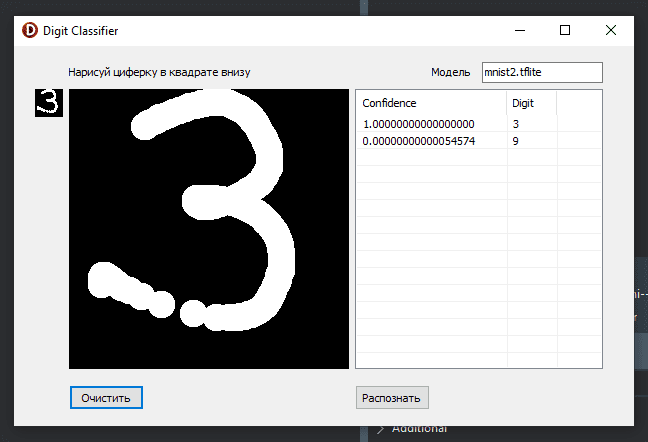
プロジェクト全体をダウンロードしてテストすることができます。下図のように、手書きの数字を描くと、TensorFlowはそのデータを28×28ピクセルの画像として取得し、それを変換して0から9までの数字として返します。

実際の画像を再現するために、28×28ピクセルの入力は、784ピクセルの1次元ベクトルにフラット化しています。つまり、画像を構成する784ピクセルのそれぞれは、0〜255のの範囲の値として格納されます。これは、画像が白黒で表示されるため、ピクセルのグレースケールを判断するのに役立ちます。入力画像の黒いピクセルは255で表され、白いピクセルは0で表されます。

procedure TForm1.Button2Click(Sender: TObject);
var
  i, X, Y: DWORD;

  fLibrary: HMODULE;
  fModel: Pointer;
  fInterpreterOptions: Pointer;
  fInterpreter: Pointer;
  fStatus: TfLiteStatus;
  fInputTensorCount, fOutputTensorCount, fNumDims: Int32;
  fInputTensor, fOutputTensor: Pointer;
  fInputDims: Integer;
  fTensorName: PAnsiChar;
  fTensorType: TfLiteType;
  fTensorByteSize: SIZE_T;

  // 28x28 pixel image as input
  fInput: array [0 .. 28 * 28 - 1] of Float32;

  // output 0 to 9
  fOutput: array [0 .. 10 - 1] of Float32;

  fValue: Extended;
begin
  fLibrary := LoadLibrary(LibraryName);

  if fLibrary = 0 then
  begin
    ShowMessage('Error: Load tensorflow lite library ' + LibraryName + ' - ' +
      SysErrorMessage(GetLastError));
    Exit;
  end;

  try
    fModel := TfLiteModelCreateFromFile(PAnsiChar(AnsiString(Edit1.Text)));

    if fModel = nil then
    begin
      ShowMessage('Error: Create model from file - ' +
        SysErrorMessage(GetLastError));
      Exit;
    end;

    fInterpreterOptions := TfLiteInterpreterOptionsCreate;

    if fInterpreterOptions <> nil then
    begin
      TfLiteInterpreterOptionsSetNumThreads(fInterpreterOptions, 2);

      fInterpreter := TfLiteInterpreterCreate(fModel, fInterpreterOptions);

      // parameters / model can be removed immediately after the interpreter is created
      TfLiteInterpreterOptionsDelete(fInterpreterOptions);
      TfLiteModelDelete(fModel);

      if fInterpreter <> nil then
      begin
        fStatus := TfLiteInterpreterAllocateTensors(fInterpreter);

        fInputTensorCount := TfLiteInterpreterGetInputTensorCount(fInterpreter);
        fOutputTensorCount := TfLiteInterpreterGetOutputTensorCount
          (fInterpreter);

        // fLiteTensor* TfLiteInterpreterGetInputTensor(const TfLiteInterpreter* interpreter, int32_t input_index);
        // returned structure TfLiteTensor
        // an example is simple, there is no need to translate everything from the
        // in general, the source of the: https://github.com/tensorflow/tensorflow/tree/master/tensorflow/lite/c
        { typedef struct TfLiteTensor {
          TfLiteType type;
          TfLitePtrUnion data;
          TfLiteIntArray* dims;
          TfLiteQuantizationParams params;
          TfLiteAllocationType allocation_type;
          size_t bytes;
          const void* allocation;
          const char* name;
          struct TfLiteDelegate* delegate;
          TfLiteBufferHandle buffer_handle;
          bool data_is_stale;
          bool is_variable;
          TfLiteQuantization quantization;
          TfLiteSparsity* sparsity;
          const TfLiteIntArray* dims_signature; }
        fInputTensor := TfLiteInterpreterGetInputTensor(fInterpreter, 0);
        fOutputTensor := TfLiteInterpreterGetOutputTensor(fInterpreter, 0);

        if fInputTensor <> nil then
        begin
          // info about tensor
          // fNumDims := TfLiteTensorNumDims(fInputTensor);
          // fTensorName := TfLiteTensorName(fInputTensor);
          // fTensorType := TfLiteTensorType(fInputTensor);
          fTensorByteSize := TfLiteTensorByteSize(fInputTensor);

          // writing pixels to fInput, top to bottom, left to right
          for Y := 0 to Image1.Picture.Bitmap.Height - 1 do
          begin
            for X := 0 to Image1.Picture.Bitmap.Width - 1 do
            begin
              if (Image1.Canvas.Pixels[X, Y] > 0) then
                fInput[X + (Y * Image1.Picture.Bitmap.Width)] := 1
              else
                fInput[X + (Y * Image1.Picture.Bitmap.Width)] := 0;
            end;
          end;

          // fTensorByteSize = Length(fInput) * SizeOf(Float32)
          fStatus := TfLiteTensorCopyFromBuffer(fInputTensor, @fInput,
            fTensorByteSize);

          fStatus := TfLiteInterpreterInvoke(fInterpreter);

          if fStatus = kTfLiteOk then
          begin
            for i := 0 to High(fOutput) do
              fOutput[i] := 0;

            fOutputTensor := TfLiteInterpreterGetOutputTensor(fInterpreter, 0);

            // info about tensor
            // fNumDims := TfLiteTensorNumDims(fOutputTensor);
            // fTensorName := TfLiteTensorName(fOutputTensor);
            // fTensorType := TfLiteTensorType(fOutputTensor);
            fTensorByteSize := TfLiteTensorByteSize(fOutputTensor);

            if fOutputTensor <> nil then
            begin
              // fTensorByteSize = Length(fOutput) * SizeOf(Float32)
              fStatus := TfLiteTensorCopyToBuffer(fOutputTensor, @fOutput,
                fTensorByteSize);

              if fStatus = kTfLiteOk then
              begin
                ListView1.Items.Clear;

                for i := 0 to Length(fOutput) - 1 do
                begin
                  // ingenious solution, coolest conversion
                  fValue := StrToFloat(Copy(FloatToStr(fOutput[i]), 1, 17));

                  if fValue <= 1 then
                  begin
                    with ListView1.Items.Add do
                    begin
                      Caption := FloatToStrF(fValue, ffNumber, 17, 17);
                      SubItems.Add(IntToStr(i));
                    end;
                  end;
                end;

                ListView1.AlphaSort;

                Beep;
              end;
            end;
          end;
        end;
      end;
    end;
  finally
    FreeLibrary(fLibrary);
  end;
end;
下記のリンクにアクセスしてサンプルコードをダウンロードし、実際に試してみてください。
https://github.com/qq33095304/TensorFlow-Lite-Delphi


Reduce development time and get to market faster with RAD Studio, Delphi, or C++Builder.
Design. Code. Compile. Deploy.
Free Delphi Community Edition Free C++Builder Community Edition