



Spoiler Alert: it’s REALLY easy to add a REST API to your own Development on Windows desktop applications. Read along with us and we’ll show you exactly how easy it is! Expressjs is a fast, ‘unopinionated’ minimalist web framework for Node.js. It provides a great combination of features that make web application development fast and easy which would otherwise be much more time-consuming using only plain Node.js. ExpressJS can also make it very easy for us to build and expose fast and robust APIs for our users. Because of this powerful ease of use ExpressJS is a very popular framework among Nodejs’s developers.
Are there any Delphi frameworks similar to ExpressJS?
We Delphi developers are a lucky bunch, blessed with a huge range of Delphi components and libraries and thankfully, inspired by the ExpressJS concept, we now have Opensource project called Horse which can be found at https://github.com/HashLoad/horse. Horse is a web framework for Delphi. Designed to ease things up for fast development in a minimalist way and yet achieving high performance.
Let’s compare ExpressJS with the Delphi Horse framework
ExpressJS :
app.get('/path_here', function (req, res) {
  res.send('GET request to the homepage')
})
Horse:
begin
  THorse.get('/path_here', procedure(Req: THorseRequest; Res: THorseResponse; Next: TProc) begin
      Res.Send('GET request to the homepage');
  end);
end.
very similar isn’t it? and it looks simple when making API route
What are the steps to create an application using Horse?
Here’s how to create an API server application, which is a bit similar to what can be done with expressjs. The steps are:
- Download or clone the repository
git clone https://github.com/HashLoad/horse
- Launch your Delphi IDE and Create new Application Console
- Open Project source and paste the following code:
program horse1;

{$APPTYPE CONSOLE}

{$R *.res}

uses
  Horse,
  System.SysUtils,
  index in 'approutesindex.pas',
  employee in 'approutesemployee.pas';

begin
  try
    with THorse.Group.Prefix('/apis') do begin
      Route('/')
        .Get(index.API_Index);
      Route('/employees')
        .Get(employee.Get_Employees);
      Route('/employees/:id')
        .Get(employee.Get_Employee);
    end;

    THorse.Listen(8080, procedure(Horse: THorse) begin
        Writeln(Format('Server is runing on %s:%d', [Horse.Host, Horse.Port]));
      end
    );

  except
    on E: Exception do
      Writeln(E.ClassName, ': ', E.Message);
  end;
end.
- Create folder app/routes, so the folder’s structure became like below:

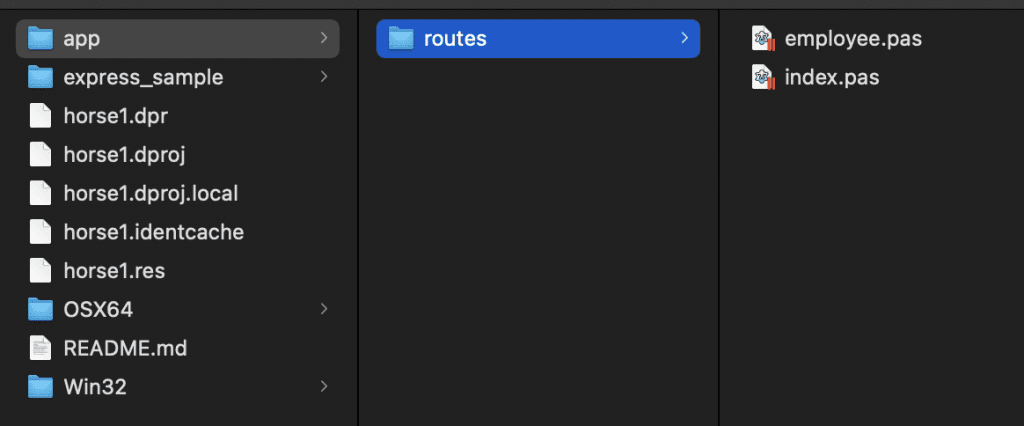
- Create a new unit file, name it
index.pas - Create another unit and call it
employee.pas
Here is the Delphi example code for creating a REST API using the Horse framework
index.pas
unit index;

interface

uses
  Horse, System.JSON;

procedure API_Index(Req: THorseRequest; Res: THorseResponse; Next: TProc);

implementation

procedure API_Index(Req: THorseRequest; Res: THorseResponse; Next: TProc);
var
  LRespObj: TJSONObject;
begin
  LRespObj:= TJSONObject.Create;
  try
    LRespObj.AddPair(TJSONPair.Create('r', TJSONBool.Create(true)));
    LRespObj.AddPair(TJSONPair.Create('m', TJSONString.Create('this is an API index using https://github.com/HashLoad/horse')));
    Res.Send(LRespObj.ToString);
  finally
    LRespObj.Free;
  end;
end;

end.
employee.pas
unit employee;

interface

uses
  Horse, System.JSON, sysutils;

procedure Get_Employees(Req: THorseRequest; Res: THorseResponse; Next: TProc);
procedure Get_Employee(Req: THorseRequest; Res: THorseResponse; Next: TProc);

implementation

procedure Get_Employees(Req: THorseRequest; Res: THorseResponse; Next: TProc);
var
  LRespArr: TJSONArray;
  LRespObj: TJSONObject;
  LEmployee1, LEmployee2, LEmployee3, LEmployee4, LEmployee5: TJSONObject;
begin
  LRespObj:= TJSONObject.Create;
  LRespArr:= TJSONArray.Create;
  LEmployee1:= TJSONObject.Create;
  LEmployee2:= TJSONObject.Create;
  LEmployee3:= TJSONObject.Create;
  LEmployee4:= TJSONObject.Create;
  LEmployee5:= TJSONObject.Create;
  try
    LEmployee1.AddPair(TJSONPair.Create('id', TJSONNumber.Create(1)));
    LEmployee1.AddPair(TJSONPair.Create('name', 'Employee1'));

    LEmployee2.AddPair(TJSONPair.Create('id', TJSONNumber.Create(2)));
    LEmployee2.AddPair(TJSONPair.Create('name', 'Employee2'));

    LEmployee3.AddPair(TJSONPair.Create('id', TJSONNumber.Create(3)));
    LEmployee3.AddPair(TJSONPair.Create('name', 'Employee3'));

    LEmployee4.AddPair(TJSONPair.Create('id', TJSONNumber.Create(4)));
    LEmployee4.AddPair(TJSONPair.Create('name', 'Employee4'));

    LEmployee5.AddPair(TJSONPair.Create('id', TJSONNumber.Create(5)));
    LEmployee5.AddPair(TJSONPair.Create('name', 'Employee5'));
    LRespArr.AddElement(LEmployee1);
    LRespArr.AddElement(LEmployee2);
    LRespArr.AddElement(LEmployee3);
    LRespArr.AddElement(LEmployee4);
    LRespArr.AddElement(LEmployee5);

    LRespObj.AddPair(TJSONPair.Create('r', TJSONBool.Create(true)));
    LRespObj.AddPair(TJSONPair.Create('m', 'Success'));
    LRespObj.AddPair(TJSONPair.Create('d', LRespArr));

    Res.Send(LRespObj.ToString);
  finally
    LRespObj.Free;
  end;
end;

procedure Get_Employee(Req: THorseRequest; Res: THorseResponse; Next: TProc);
var
  LRespObj: TJSONObject;
  LEmployeeSelected: TJSONObject;
  id: Double;
begin
  id := StrToFloat(Req.Params['id']);

  LRespObj := TJSONObject.Create;
  LEmployeeSelected := TJSONObject.Create;
  LEmployeeSelected.AddPair(TJSONPair.Create('name', 'Employee'+Req.Params['id']));
  LEmployeeSelected.AddPair(TJSONPair.Create('id', TJSONNumber.Create(id)));

  LRespObj.AddPair(TJSONPair.Create('r', TJSONBool.Create(true)));
  LRespObj.AddPair(TJSONPair.Create('m', 'Success'));
  LRespObj.AddPair(TJSONPair.Create('d', LEmployeeSelected));
  res.Send(LRespObj.ToString);
end;

end.
Creating file API Path per file, making it easy for developers in further development or code troubleshoot. that’s it.
Now run the program, and point your browser at http://localhost:8080/apis/employees/3 , You will see the response as below:
{"r":true,"m":"Success","d":{"name":"Employee3","id":3}}
Get the latest news and updates on this Delphi forum page as well as links to several resource sites.
So, adding a REST API to your own applications really is easy isn’t it? Why not give it a try yourself? You can get all of the example source code from the following link: https://github.com/checkdigits/horse-API-Demo