


このパッチは、RAD Studio 10.4 の Delphiコンパイラ、RAD Studio IDE全般、特に新しい LSP ベースの Code Insight、C++ Builder Android の例外やデバッガーの問題など、RAD Studio 10.4 の多くの問題が改善されています。
このパッチのインストールには、Patch 1(別途 GetIt やカスタマーポータルで入手可能) を事前にインストールしておく必要があります。このパッチのインストールは、全てのRAD Studio 10.4ユーザーに推奨されています。このパッチのダウンロード容量はかなり大きい(約 190 MB)ことに注意してください。
Patch 2はGetItから入手する場合でもインストール用のバッチファイルを手動で実行する必要があります。Patch 1 とは違い、自動的なインストールは行われません。インストールの手順はパッチに付属する Patch2-readme.txt やこのブログ記事をご確認の上、手順に従ってインストールしてください。
Table of Contents
Patch 2のダウンロード方法
パッチをダウンロードするには、RAD Studio IDE の GetIt を使用することをお勧めします。パッチは、IDE のウェルカムページに一覧表示されており、下図に示すようにGetIt パッケージマネージャの “Patches and Hotfixes” セクションで利用できます。
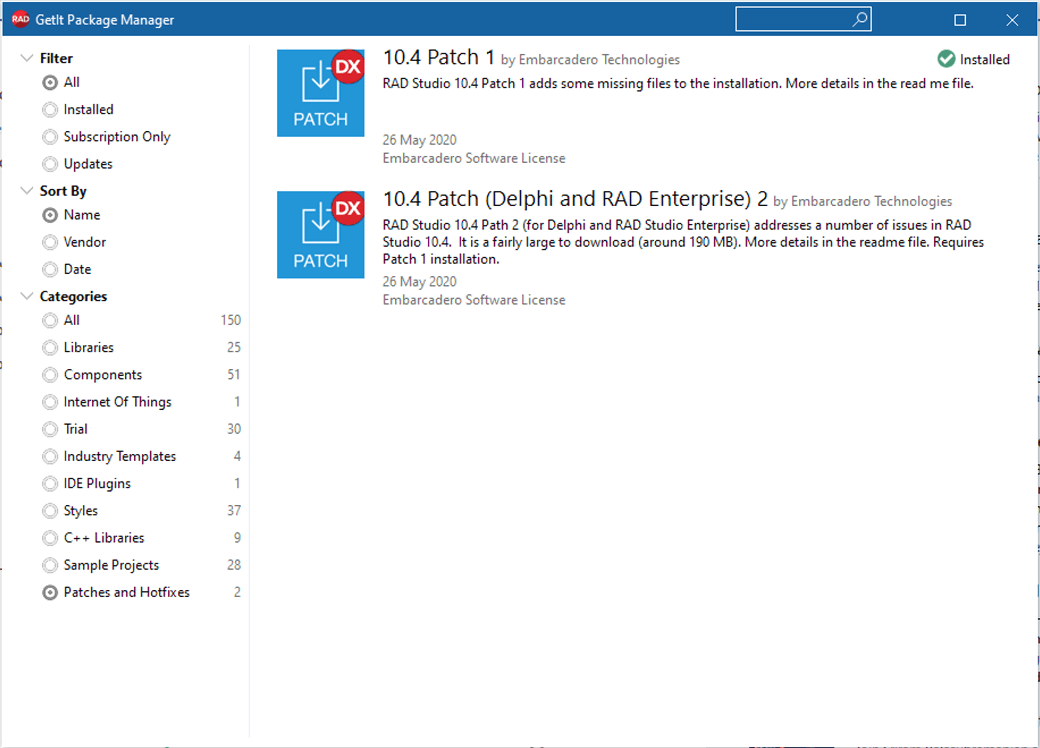
パッチには、Professional、Entepriseそれぞれのエディションに対応したPatch 2が用意されています。 GetItのリストには、PCにインストールしているエディション用のパッチが表示されますので、それを選択してください。
もし10.4 Patch1が”インストール済み”でなければ、Patch2よりも先にインストールしてください。
注意:RAD Studio IDE の GetIt を使用してPatch 2 をインストールするには、インターネット接続が必要です。オフライン (ISO) インストーラを使用して RAD Studio をインストールした場合は、GetItCmd -c=useonlineコマンドを発行する必要がある場合もあります(GetItCmdコマンドを一度も発行していない場合)。
GetIt から Patch 2 を選択してインストール ボタンを押すと、RAD Studio ライセンス (リリースされているライセンス) に同意するように求められます。ライセンスに同意すると、ダウンロードが開始されます。(ダウンロードには、時間がかかる場合があります。)

Patch 2のインストール方法
ダウンロードが完了すると、GetIt は readme ファイルとダウンロードフォルダを開きます(下図参照)。GetIt はパッチをダウンロードするだけで、インストールはしないので、Patch 2 のインストールは手動で行う必要があります。
パッチの実行ファイルは、ZIPファイルと一緒に以下のフォルダにコピーされます。
C:Users(LoginName)DocumentsEmbarcaderoStudio21.0CatalogRepository10.4Patch2xx-10R104_Patch2

このフォルダは、最後の GetIt アクションによって自動的に開かれますので、RAD Studio 10.4 IDE (別プロセスで実行されている可能性があるRAD Studio IDEも含む) を終了し、上記のフォルダからバッチファイル patch2.bat を実行してください。
注意:以下のインストール手順は、利用しているウイルス対策ソフトウェアによって警告が表示される可能性があります。
パッチをインストールするプロセスは、UACによる昇格が必要で、手順を表示し、詳細なログファイルをカタログリポジトリフォルダに追加します。


上図で示すように、元の10.4リリースで欠落していたファイルが追加されるため、想定される通り、インストール時にいくつかの警告が表示されます(実際には2つの警告が表示されます)。また、画面に表示された情報は、パッチのカタログリポジトリフォルダにあるpatch.logというファイルにも記録されます。
インストールのプロセスが終了すると、コマンドライン ウィンドウを閉じて、RAD Studio 10.4 IDE を再起動することができます。
正常にインストールされているかの確認
パッチが正常にインストールされたことを確認するには、置き換えられたファイルのタイムスタンプを確認します。例えば、$(BDS)/binフォルダ内のgetit170.bplは、2020年5月のタイムスタンプではなく、2020年7月のタイムスタンプになっています。
アンインストールの手順
もしパッチのインストールで問題が発生した場合は、RAD Studio を終了し、Catalog Repository のインストール フォルダ(C:Users(LoginName)DocumentsEmbarcaderoStudio21.0CatalogRepository10.4Patch2xx-10R104_Patch2)を開き、patch2uninstall.bat を実行してパッチを削除することができます。これにより、オリジナル バージョンのバックアップ ファイルが復元されます。
パッチプロセスは、RAD Studio のインストールフォルダの _patch_backup サブフォルダに置き換えられたファイルのバックアップを作成します。実行ごとに、インストールのタイムスタンプを含むサブフォルダーが作成されます。これには、install.logファイルも含まれます。 パッチをアンインストールする代わりに、このバックアップフォルダーからメインのBDSフォルダにファイルを手動でコピーできます。
パッチをアンインストールした後、GetItからパッケージをアンインストールすることができます。最初に GetIt からパッケージをアンインストールすると、ダウンロードとアンインストール スクリプトは削除されますが、インストールされているパッチは削除されません。この場合、上記のようにバックアップフォルダから手動でファイルを復元するか、パッチを再度ダウンロードしてアンインストールバッチファイルを実行してください。
10.4 Patch2で改善されたユーザーから報告された問題リスト
RAD Studio 10.4 Patch 2は、Embarcadero Quality Portalでユーザーから報告された以下の問題を修正しています。
RSP-29628 VCL Grids bug
RSP-29560 [REGRESSION] Misalignment in TStringGrid, StretchDraw method in OnDrawCell
RSP-29412 Compiler generates incorrect code for if-then
RSP-29402 Delphi 10.4 TStringGrid.OnDrawCell bug
RSP-29374 Wrong rect coords in TStringGridDrawCell, so image are drawn at wrong position
RSP-29347 [DelphiLSP] IDE Crashes when view form as text is selected and running LSP server
RSP-29310 Internal error L891 when linking because of complex types based on records with class var
RSP-29299 CODEGEN bug in managed fields initialization, associated with new management operators.
RSP-29271 [DelphiLSP] Code Insight adds unneeded () when changing procedures/functions
RSP-29256 Compiler generates wrong code for template function
RSP-29227 Incorrect property value obtained from the record
RSP-29226 Access violation with working code under 10.2
RSP-29218 compiling static library under Android error E4620 processing resource .fmx -2 raised
RSP-29172 Access Violation when opening License Manager
RSP-29142 GoTo statements not working
RSP-29136 Dialog constantly pops up during debugging
RSP-29129 iOS App simply crashes with a TWebBrowser on it.
RSP-29127 Compiler internal error if you ignore the result of a function that returns a generic record
RSP-29124 ICE E1812
RSP-28989 License Manager has access violation error when i click on Workstation Licenses
RSP-28887 Space does not finish code completion
RSP-28857 Default(T) generates bad code for managed record
RSP-28821 [Regression] TStringGrid.OnDrawCell parameter Rect contains wrong values
RSP-28808 Project options dialog page “Delphi Compiler” is not populated when opening the dialog
RSP-28796 RVO for M-records: initialisation of local variables
RSP-28761 [REGRESSION] E2154 Type ‘T’ needs finalization – not allowed in variant record
RSP-28737 Compiler error when inlining new Bit Counting Standard Functions
RSP-28735 Managed Records Causing Internal Compiler Error
RSP-28717 Delphi Package fails to compile
RSP-28701 Bind visually on TDBGRID kills the IDE
RSP-28669 [BadCG] Value M-record parameters: improper AddRefRecord
RSP-28659 RVO for M-records: assignment to local variables
RSP-28616 [BadCG] Operator Assign should not allow non-default calling conventions
RSP-28615 [BadCG] In the absence of Initialize, finalisation is not guaranteed for local variables
RSP-28552 Poor code generation for local managed record variables
RSP-28499 Options – Translation tools – Font – Corrupted?
RSP-28476 LSP ErrorInsight in Structure Pane only shows one keystroke after editor
RSP-28400 [BadCG] Operator Assign is not always invoked for fields
RSP-28372 [Regression] Bad codegen in function returning generic type
RSP-27268 C++ Builder 10.3.3 Android Exceptions
RSP-27251 Internal error when trying to inline with optimization on
RSP-24079 Package version is broken
RSP-23403 Build for linux 64 error
RSP-23024 Record helper class constructor gives senseless compiler warning
RSP-22318 Pointer type check missed when object field is a dynarray
RSP-21554 Compiler generates incorrect code for parameterized record type
RSP-21248 Const dynamic array unexpectedly contains uninitialized data
RSP-20372 A generic “reference to function” will only match the first of several overloaded functions
RSP-19714 Win32 compiler – Memory corruption with array helpers
RSP-18241 *.c source files, added to C++ project, got added to DeploymentManager file list
RSP-18148 AV in TList<T>.Remove (64-bit compiler only)



Reduce development time and get to market faster with RAD Studio, Delphi, or C++Builder.
Design. Code. Compile. Deploy.
Free Delphi Community Edition Free C++Builder Community Edition


