


We are happy to announce that today Embarcadero has released an update for InterBase 15, its flagship database engine. InterBase is a powerful, zero-administration, small footprint database engine that can power your data on everything whether it is a server or running on your mobile devices as an embedded database.
InterBase 15 Update 1 is a maintenance update for InterBase 15 customers. Building on the strong foundation of InterBase 15, including its enhanced encryption and security capabilities, this release introduces the first AI-enhanced version of IBConsole along with a range of quality and platform improvements.
The new Smart CodeInsight functionality in IBConsole brings optional AI assistance directly into the database management and SQL development workflow. Using a secure bring-your-own-key (BYOK) approach, users can connect to LLM providers such as OpenAI, Gemini, Claude, and offline models through inference engines such as Ollama and LM Studio. Smart CodeInsight in IBConsole enables developers and DBAs to interact with databases using natural language to generate and optimize SQL, explain queries, document database objects, and receive context-aware guidance based on live InterBase metadata.
By integrating AI directly into the Interactive SQL environment and database management tools, IBConsole Smart CodeInsight helps streamline development tasks, reduce repetitive manual work, simplify complex SQL operations, and improve productivity for both experienced DBAs and application developers.
In addition to the AI features, IBConsole has also seen a significant number of UX improvements, particularly in terms of overall navigation with the side tree view and tabs.
This release also includes numerous quality improvements that enhance overall stability, usability, and platform compatibility, including improved support for installation on Windows Server 2025 and Ubuntu Linux 24.

More About IBConsole Smart CodeInsight
The remainder of this blog post offers some more information about the Smart CodeInsight features in IBConsole, which have been built leveraging RAD Studio SmartCore AI components – thanks to IBConsole being written in Delphi, using VCL and the IBX components.
Multi-Engine AI Support
IBConsole Smart CodeInsight supports multiple AI engines and models, allowing organizations flexibility in choosing their preferred AI providers and configurations. Supported capabilities include:
- Configurable AI engines
- Model selection
- API-based integrations
- Connection testing
- Per-window engine selection

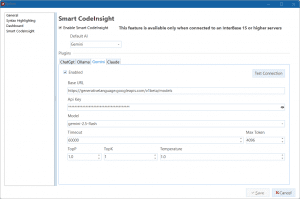
If AI is not part of your plans, don’t worry, because the integration is off by default and totally under your control. This architecture allows customers to adapt AI usage to their own security, compliance, and infrastructure requirements. Below is an image of the Smart CodeInsight configuration dialog box.
AI-Powered SQL Assistance
Users can interact with AI directly inside IBConsole using natural language prompts. The system supports contextual SQL generation, query explanations, formatting, optimization, and stored procedure generation.
Examples include:
- SQL query generation
- Query optimization recommendations
- SQL formatting and cleanup
- Query explanations
- SQL dialect conversion
- Stored procedure generation from SQL
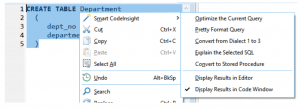
As an example, you can select the text of a query and perform a number of different options on it, as you can see below:

Context-Aware Database Intelligence
One of the standout new features is IBConsole Smart CodeInsight’s metadata-aware AI prompting system. Instead of requiring users to remember and manually describe database structures, IBConsole automatically injects schema metadata into prompts using intelligent macros. This enables the AI engine to understand:
- Tables
- Views
- Stored procedures
- Triggers
- Indices
- Domains
- Relationships
- Query plans
- Editor selections
The result is dramatically more accurate and relevant AI responses for real-world database tasks. As you can see below, this feature is activated by selecting Smart CodeInsight command while an entity is selected, in this case a field of a table:

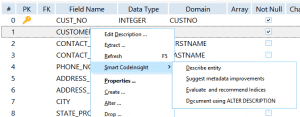
Activating IBConsole Smart CodeInsight for a table field
Built-In Metadata Macros
IBConsole Smart CodeInsight includes a powerful macro system that automatically expands database object metadata into AI prompts when using an AI chat window. Supported macros include:
- Tables
- Views
- Procedures
- Triggers
- Indices
- Functions
- Tablespaces
- Encryption metadata
- Selected SQL text
- Full editor contents
This removes the need for developers to manually copy and paste schema details into AI tools.
AI-Assisted Performance Optimization
The platform helps developers improve database performance through intelligent analysis of:
- SQL queries
- Query execution plans
- Index selectivity
- Table structures
- Metadata relationships
In these areas, IBConsole Smart CodeInsight can:
- Recommend index improvements
- Analyze query plans
- Suggest query optimizations
- Identify schema normalization opportunities
Automated Documentation Generation
IBConsole Smart CodeInsight can automatically generate descriptive metadata and documentation scripts using InterBase ALTER DESCRIPTION syntax.
This helps organizations:
- Improve database maintainability
- Accelerate onboarding
- Standardize documentation
- Preserve institutional knowledge
Interactive SQL Editor Integration
The AI assistant is deeply integrated into the Interactive SQL environment inside IBConsole. Developers can:
- Highlight SQL and request optimization
- Explain selected queries
- Reformat SQL automatically
- Convert SQL into stored procedures
- Convert legacy Dialect 1 SQL to Dialect 3
- Drag and drop schema objects directly into prompts
This creates a seamless AI-assisted development workflow without leaving the IDE.
More Information
For more details on Smart CodeInsight in IBConsole you can read the product documentation starting from:
https://docwiki.embarcadero.com/InterBase/15/en/CodeInsight_Main_Window
In general, you can find more information on InterBase 15.1 at following links:
- The product page on the Embarcadero company website, https://www.embarcadero.com/products/interbase
- The product documentation site main page, https://docwiki.embarcadero.com/InterBase/15/en/Main_Page
Customers with an active InterBase 15 license can find the links for the installers at my.embarcadero.com. The trial version is available on the Embarcadero web site along with the free InterBase 15 Developer Edition, which you can find at https://www.embarcadero.com/products/interbase/developer/free-download