


Today Embarcadero released Kai 1.0.1, an update focused on quality, stability, and usability improvements for the first release of the company’s agentic AI engine.
The Kai 1.0.1 version includes a set of quality improvements and adds a small feature requested by customers. Installing this update is highly recommended for all Kai users, whether using a paid license or the trial version.
What is Kai?
Embarcadero Kai is an AI-powered, agentic development assistant for RAD Studio that helps Delphi and C++Builder developers write, understand, refactor, and modernize code directly within the IDE. It supports leading cloud AI models as well as local LLMs, enabling developers to automate development tasks while maintaining control over their code, models, and workflows. For more information, please check the main Kai product page.
Authenticated Connections for “Local” AI Engines
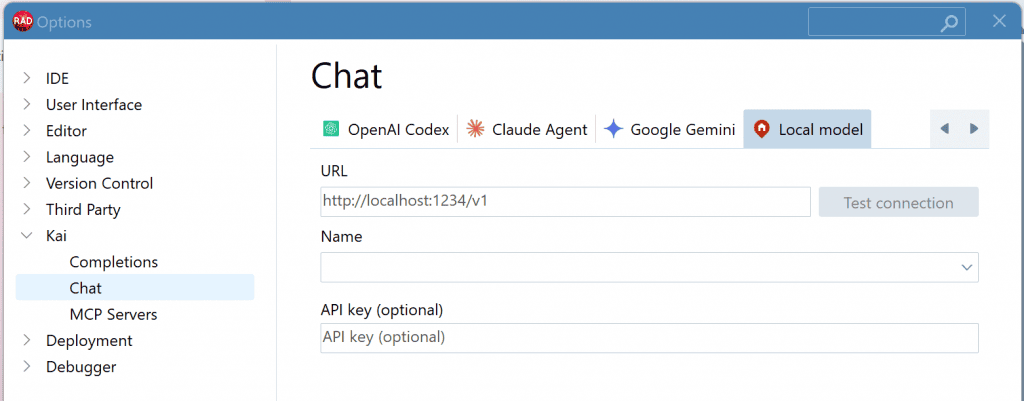
In this 1.0.1 update we added support for authenticated local AI servers. Kai now supports authentication when connecting to local AI servers such as Ollama and LM Studio. This enables secure connections to AI models hosted on remote or cloud-based infrastructure where authentication is required, making Kai suitable for shared AI environments.

Kai Quality and Stability Improvements
Kai 1.0.1 improves the overall quality, stability, and usability of the product, delivering a more reliable day-to-day experience for RAD Studio developers. The improvements focus on four areas:
- Improved stability and reliability. Resolved issues that could lead to IDE instability, making Kai more robust in everyday use.
- Better AI provider integration. Improved authentication and connectivity for both local and cloud AI models, including Ollama, LM Studio, and Claude.
- Enhanced coding experience. Improved inline completions, ghost text, suggestion rendering, clipboard operations, and compatibility with both modern and Classic Code Insight.
- Refined user interface and usability. Visual and user interface issues have been addressed, including layout, theming, font sizing, icon rendering, resizing behavior, navigation controls, and clearer terminology.
Together, these improvements make Kai more stable, more compatible with a wider range of AI providers and developer environments, and more polished for everyday development.
Customer-Reported Issues Addressed
As part of this update, the development team resolved a number of customer-reported issues submitted through the Embarcadero Quality Portal, including:
- RSS-5524: KAI IDE stability issue
- RSS-5462: KAI installation – projects don’t open with “Duplicates not allowed”.
- RSS-5519: Cannot connect to local model which needs API key – please add field for adding API key
- RSS-5470: It pops up error for each 3 keystroke when I write code
- RSS-5483: Reword item in KAI combobox from “default” to something like “ask” or “ask before change”
- RSS-5461: Kai Refusing To See Claude Login and associated tickets RSS-5469 and RSS-5471
- RSS-5460: Completion chat (Ollama) with KAI in ghost mode doesn’t work
How to Get Kai 1.0.1
The new version of Kai is already available in GetIt. You can find it in the GetIt package manager dialog box, or see it advertised in the Kai Welcome Page section. The installer automatically removes the previous version and installs Kai 1.0.1. A restart of RAD Studio is required to complete the update.
Kai 1.0.1 will also be available shortly from the Embarcadero Download portal at my.embarcadero.com.
Interested in a Trial?
If you haven’t tried Kai and are interested in a trial license, there are three ways to get one:
- Existing RAD Studio, Delphi, or C++Builder 12.x/13.x customer with a named-user license can install Kai from GetIt (or download it from the Customer Portal), then redeem a 30-day Kai trial license using your existing product license key on the Kai redemption page.
- Existing Network/Concurrent license customers can contact Embarcadero Sales to obtain a Kai trial license.
- Developers not on a recent version of RAD Studio can download the RAD Studio trial, which already includes a Kai trial license, so the only requirement is to download Kai from the GetIt Package Manager or the Welcome Page after installing RAD Studio.
Work on Kai is Continuing
We’re continuing to invest in Kai with regular quality improvements, expanded AI provider support, and new capabilities driven by customer feedback. We encourage all Kai users to install version 1.0.1 and continue sharing their suggestions through the Quality Portal.